Download AWS Certified SAP on AWS - Specialty.PAS-C01.Pass4Success.2026-06-22.56q.vcex
| Vendor: | Amazon |
| Exam Code: | PAS-C01 |
| Exam Name: | AWS Certified SAP on AWS - Specialty |
| Date: | Jun 22, 2026 |
| File Size: | 733 KB |
How to open VCEX files?
Files with VCEX extension can be opened by ProfExam Simulator.
Purchase
Coupon: TAURUSSIM_20OFF
Discount: 20%
Demo Questions
Question 1
A company is running an SAP HANA database on AWS The company is running AWS Backint Agent for SAP HANA(AWS Backint agent) on an Amazon EC2 instance AWS Back agent is configured to back up to an Amazon S3 bucket The backups are failing with an Access Denied error m the AWS Backint agent log file.
What should an SAP basis administrator do to resolve this error?
- Assign execute permissions at the operating system level for the AWS Backint agent binary and for AWS Backint agent
- Assign an IAM role to an EC2 instance Attach a policy to the IAM role to grant access to the target S3 bucket
- Assign the correct Region ID for the S3BucketAwsRegion parameter in AWS Backint agent for the SAP HANA configuration file
- Assign the value for the Enable Tagging parameter in AWS Backint agent for the SAP HANA configuration file
Correct answer: B
Explanation:
The error message 'AccessDenied' usually indicates that the AWS Backint agent does not have the necessary permissions to access the target S3 bucket. To resolve this error, an SAP basis administrator should assign an IAM role to the EC2 instance that is running the AWS Backint agent. Then, the administrator should attach a policy to the IAM role that grants the necessary permissions to access the target S3 bucket. This will allow the AWS Backint agent to access the S3 bucket and complete the backups successfully. The error message 'AccessDenied' usually indicates that the AWS Backint agent does not have the necessary permissions to access the target S3 bucket. To resolve this error, an SAP basis administrator should assign an IAM role to the EC2 instance that is running the AWS Backint agent. Then, the administrator should attach a policy to the IAM role that grants the necessary permissions to access the target S3 bucket. This will allow the AWS Backint agent to access the S3 bucket and complete the backups successfully.
Question 2
A company is starting a new project to implement an SAP landscape with multiple accounts that belong to multiple teams in the us-east-2 Region. These teams include procurement finance sales and human resources An SAP solutions architect has started designing this new landscape and the AWS account structures
The company wants to use automation as much as possible The company also wants to secure the environment implement federated access to accounts centralize logging and establish cross-account security audits in addition the company's management team needs to receive a top-level summary of policies that are applied to the AWS accounts.
What should the SAP solutions architect do to meet these requirements?
- Use AWS CloudFormation StackSets to apply SCPs to multiple accounts in multiple Regions. Use an Amazon CloudWatch dashboard to check the applied policies in the accounts
- Use an AWS Elastic Beanstalk blue green deployment to create 1AM policies and apply them to multiple accounts together Use an Amazon CloudWatch dashboard to check the applied policies in the accounts
- Implement guardrails by using AWS CodeDeploy and AWS CodePipeline to deploy SCPs into each account Use the CodePipeline deployment dashboard to check the applied policies in the accounts
- Apply SCPs through AWS Control Tower Use the AWS Control Tower integrated dashboard to check the applied policies in the accounts
Correct answer: D
Explanation:
AWS Control Tower is a service that automates the set up of a secure, compliant, multi-account AWS environment. It helps to establish guardrails and automate the deployment of security policies to multiple accounts in a centralized and consistent manner. By using AWS Control Tower, the SAP solutions architect can establish guardrails across all accounts, set up federated access, centralize logging, and establish cross-account security audits. The integrated dashboard in AWS Control Tower allows the management team to receive a top-level summary of policies that are applied to the AWS accounts. This will help the company to meet their requirements of using automation as much as possible, securing the environment and implementing federated access to accounts, centralizing logging and establishing cross-account security audits. AWS Control Tower is a service that automates the set up of a secure, compliant, multi-account AWS environment. It helps to establish guardrails and automate the deployment of security policies to multiple accounts in a centralized and consistent manner. By using AWS Control Tower, the SAP solutions architect can establish guardrails across all accounts, set up federated access, centralize logging, and establish cross-account security audits. The integrated dashboard in AWS Control Tower allows the management team to receive a top-level summary of policies that are applied to the AWS accounts. This will help the company to meet their requirements of using automation as much as possible, securing the environment and implementing federated access to accounts, centralizing logging and establishing cross-account security audits.
Question 3
A company has deployed SAP workloads on AWS The AWS Data Provider for SAP is installed on the Amazon EC2 instance where the SAP application is running An SAP solutions architect has attached an IAM role to the EC2 instance with the following policy.
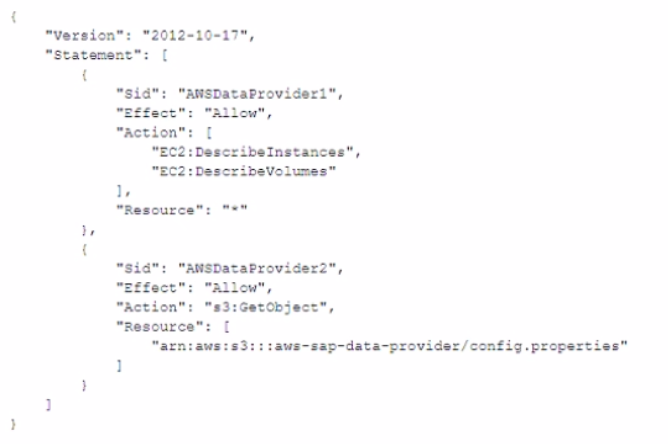
The AWS Data Provider for SAP is not returning any metrics to the SAP application. Which change should the SAP solutions architect make to the 1AM permissions to resolve this issued.
- Add the cloudwatch ListMetrics action to the policy statement with Sid AWSDataProvider1.
- Add the cloudwatch GetMetricStatrstics action to the policy statement with Sid AWSDataProvider1
- Add the cloudwatch GetMetricStream action (o the policy statement with Sid AWSDataProvider
- Add the cloudwatch DescribeAlarmsForMetric action to the policy statement with Sid AWSDataProvider
Correct answer: B
Explanation:
The AWS Data Provider for SAP requires the ability to access metrics data in order to return metrics to the SAP application. The IAM policy statement with Sid 'AWSDataProvider1' currently does not have the necessary permissions to access metrics data. The SAP solutions architect should add the cloudwatch:GetMetricStatistics action to the policy statement with Sid 'AWSDataProvider1' to grant the necessary permissions for the Data Provider to access metrics data.The other actions such as 'EC2:DescribeInstances' and 'EC2:DescribeVolumes' are not related to CloudWatch metrics and only provide the ability to describe EC2 instances and volumes. Actions such as 's3:GetObject' are not related to CloudWatch metrics, it's used to get an object from an S3 bucket. Actions such as 'cloudwatch:ListMetrics' and 'cloudwatch:DescribeAlarmsForMetric' would not be necessary for the AWS Data Provider for SAP to return metrics to the SAP application and it's not related to the problem described.https://docs.aws.amazon.com/sap/latest/general/data-provider-troubleshooting.html The AWS Data Provider for SAP requires the ability to access metrics data in order to return metrics to the SAP application. The IAM policy statement with Sid 'AWSDataProvider1' currently does not have the necessary permissions to access metrics data. The SAP solutions architect should add the cloudwatch:GetMetricStatistics action to the policy statement with Sid 'AWSDataProvider1' to grant the necessary permissions for the Data Provider to access metrics data.
The other actions such as 'EC2:DescribeInstances' and 'EC2:DescribeVolumes' are not related to CloudWatch metrics and only provide the ability to describe EC2 instances and volumes. Actions such as 's3:GetObject' are not related to CloudWatch metrics, it's used to get an object from an S3 bucket. Actions such as 'cloudwatch:ListMetrics' and 'cloudwatch:DescribeAlarmsForMetric' would not be necessary for the AWS Data Provider for SAP to return metrics to the SAP application and it's not related to the problem described.
https://docs.aws.amazon.com/sap/latest/general/data-provider-troubleshooting.html
Question 4
A company is planning to migrate its SAP workloads to AWS. The company will use two VPCs One VPC will be for production systems and one VPC will be for non-production systems. The company will host the non-production systems and the primary node of all the production systems in the same Availability Zone.
What is the MOST cost-effective way to establish a connection between me production systems and the non-production systems?
- Create an AWS Transit Gateway Attach the VPCs to the transit gateway Add the appropriate routes m the subnet route tables
- Establish a VPC peering connection between the two VPCs Add the appropriate routes in the subnet route tables
- Create an internet gateway in each VPC Use an AWS Site-to-Site VPN connection between the two VPCs Add the appropriate routes in the subnet route tables
- Set up an AWS Direct Connect connection between the two VPCs Add the appropriate routes in the subnet route tables
Correct answer: B
Explanation:
Establish a VPC peering connection between the two VPCs Add the appropriate routes in the subnet route tables is the most cost-effective way to establish a connection between the production systems and the non-production systems. VPC Peering allows for direct and private communication between VPCs and does not require any additional components such as internet gateways or VPN connections. This method is more cost-effective than using a Transit Gateway or Direct Connect and also provides better security as the traffic remains within the AWS network. Establish a VPC peering connection between the two VPCs Add the appropriate routes in the subnet route tables is the most cost-effective way to establish a connection between the production systems and the non-production systems. VPC Peering allows for direct and private communication between VPCs and does not require any additional components such as internet gateways or VPN connections. This method is more cost-effective than using a Transit Gateway or Direct Connect and also provides better security as the traffic remains within the AWS network.
Question 5
An SAP basis architect is configuring high availability for a critical SAP system on AWS. The SAP basis architect is using an overlay IP address to route traffic to the subnets across multiple Availability Zones within an AWS Region for the system's SAP HANA database.
What should the SAP basis architect do to route the traffic to the Amazon EC2 instance of the active SAP HANA database?
- Edit the route in the route table of the VPC that includes the EC2 instance that runs SAP HANA Specify the overlay IP address as the destination Specify the private IP address of the EC2 instance as the target
- Edit the inbound and outbound rules in the security group of the EC2 instance that runs SAP HANA Allow traffic for SAP HANA specific ports from the overlay IP address
- Edit the network ACL of the subnet that includes the EC2 instance that runs SAP HANA Allow traffic for SAP HANA specific ports from the overlay IP address
- Edit the route in the route table of the VPC that includes the EC2 instance that runs SAP HANA Specify the overlay IP address as the destination Specify the elastic network interface of the EC2 instance as the target
Correct answer: D
Explanation:
https://docs.aws.amazon.com/sap/latest/sap-hana/sap-hana-on-aws-cluster-configuration-prerequisites.html https://docs.aws.amazon.com/sap/latest/sap-hana/sap-hana-on-aws-cluster-configuration-prerequisites.html
Question 6
A company is running an SAP ERP Central Component (SAP ECC) system on an SAP HANA database that is 10 TB m size The company rs receiving notifications about long-running database backups every day The company uses AWS Backint Agent for SAP HANA (AWS Backint agent) on an Amazon EC2 instance to back up the database An SAP NetWeaver administrator needs to troubleshoot the problem and propose a solution
Which solution will help resolve this problem'?
- Check the UploadChanneiSize parameter for AWS Backint agent increase this value in the aws-backint-agent-config yaml configuration file based on the EC2 instance type and storage configurations
- Ensure mat AWS Backint agent is configured to send the backups to an Amazon S3 bucket over the internet Ensure that the EC2 instance is configured to access the internet through a NAT gateway
- Ensure that the backups are compressed if necessary configure AWS Backint agent to compress the backups and send them to an Amazon S3 bucket
- Check the MaximumConcurrentFilesForRestore parameter tor AWS Backint agent Increase the parameter from 5 to 10 by using the aws-backint-agent-config yaml configuration file
Correct answer: A
Explanation:
The problem is long-running database backups every day, it is likely that the backups are taking too long to complete because the upload channel size is not sufficient for the size of the backups. By increasing the UploadChannelSize parameter, the SAP NetWeaver administrator can adjust the amount of data that is sent over the network at a time, which can help to speed up the backups and reduce the time they take to complete. This can be done by editing the aws-backint-agent-config yaml configuration file and increasing the value of the UploadChannelSize parameter based on the EC2 instance type and storage configurations.https://docs.aws.amazon.com/sap/latest/sap-hana/aws-backint-agent-installing-configuring.html The problem is long-running database backups every day, it is likely that the backups are taking too long to complete because the upload channel size is not sufficient for the size of the backups. By increasing the UploadChannelSize parameter, the SAP NetWeaver administrator can adjust the amount of data that is sent over the network at a time, which can help to speed up the backups and reduce the time they take to complete. This can be done by editing the aws-backint-agent-config yaml configuration file and increasing the value of the UploadChannelSize parameter based on the EC2 instance type and storage configurations.
https://docs.aws.amazon.com/sap/latest/sap-hana/aws-backint-agent-installing-configuring.html
Question 7
A company hosts its SAP NetWeaver workload on SAP HANA m the AWS Cloud The SAP NetWeaver application is protected by a cluster solution that uses Red Hat Enterprise Linux High Availability Add-On The duster solution uses an overlay IP address to ensure that the high availability cluster is still accessible during failover scenarios.
An SAP solutions architect needs to facilitate the network connection to this overlay IP address from multiple locations These locations include more than 25 VPCs other AWS Regions and the on-premises environment The company already has set up an AWS Direct Connect connection between the on-premises environment and AWS.
What should the SAP solutions architect do to meet these requirements in the MOST scalable manner?
- Use VPC peering between the VPCs to route traffic between them
- Use AWS Transit Gateway to connect the VPCs and on-premises networks together
- Use a Network Load Balancer to route connections to various targets within VPCs
- Deploy a Direct Connect gateway to connect the Direct Connect connection over a private VIF to one or more VPCs in any accounts
Correct answer: B
Explanation:
AWS Transit Gateway allows the SAP solutions architect to connect multiple VPCs and on-premises networks together in a scalable manner. It acts as a hub that controls how traffic is routed between the connected networks. By attaching the VPCs and the on-premises environment to the Transit Gateway, the SAP solutions architect can establish a single connection to the overlay IP address in the high availability cluster, ensuring that the cluster is accessible from all locations. AWS Transit Gateway allows the SAP solutions architect to connect multiple VPCs and on-premises networks together in a scalable manner. It acts as a hub that controls how traffic is routed between the connected networks. By attaching the VPCs and the on-premises environment to the Transit Gateway, the SAP solutions architect can establish a single connection to the overlay IP address in the high availability cluster, ensuring that the cluster is accessible from all locations.
Question 8
A global enterprise is running SAP ERP Central Component (SAP ECC) workloads on Oracle in an on-premises environment. The enterprise plans to migrate to SAP S 4HANA on AWS.
The enterprise recently acquired two other companies One of the acquired companies is running SAP ECC on Oracle as its ERP system The other acquired company is running an ERP system that is not from SAP The enterprise wants to consolidate the three ERP systems into one ERP system on SAP S 4HANA on AWS Not all the data from the acquired companies needs to be migrated to the final ERP system The enterprise needs to complete this migration with a solution that minimizes cost and maximizes operational efficiency.
Which solution will meet these requirements?
- Perform a lift-and-shift migration of all the systems to AWS Migrate the ERP system that is not from SAP to SAP ECC Convert all three systems to SAP S/4HANA by using SAP Software Update Manager (SUM) Database Migration Option (DMO) Consolidate all three SAP S4HANA systems into a final SAP &4HANAsystem Decommission the other systems
- Perform a lift-and-shift migration of an the systems to AWS Migrate the enterprise's initial system to SAP HANA, and then perform a conversion to SAP S/4HANA Consolidate the two systems from the acquired companies with this SAP S4HANA system by using the Selective Data Transition approach with SAP Data Management and Landscape Transformation (DMLT)
- Use SAP Software Update Manager (SUM) Database Migration Option (DMO) with System Move to re-architect the enterprise initial system to SAP S'4HANA and to change the platform to AWS Consolidate the two systems from the acquired companies with this SAP S 4HANA system by using the Selective Data Transition approach with SAP Data Management and Landscape Transformation (DMLT)
- Use SAP Software Update Manager (SUM) Database Migration Option (DMO) with System Move to re-architect all the systems to SAP S/4HANA and to change the platform to AWS Consolidate all three SAP S-4HANA systems two a final SAP S/4HANA system Decommission the other systems
Correct answer: C
Explanation:
By using the selective data transition approach with DMLT, the enterprise would only need to migrate the data that is needed to the final ERP system, reducing the cost and effort required for the migration. Additionally, re-architecting the enterprise's initial system to SAP S/4HANA and changing the platform to AWS would allow the enterprise to take advantage of the scalability and cost savings of the cloud, while still consolidating all three ERP systems into a single SAP S/4HANA system. By using the selective data transition approach with DMLT, the enterprise would only need to migrate the data that is needed to the final ERP system, reducing the cost and effort required for the migration. Additionally, re-architecting the enterprise's initial system to SAP S/4HANA and changing the platform to AWS would allow the enterprise to take advantage of the scalability and cost savings of the cloud, while still consolidating all three ERP systems into a single SAP S/4HANA system.
Question 9
An SAP solutions architect is using AWS Systems Manager Distributor to install the AWS Data Provider for SAP on production SAP application servers and SAP HANA database servers The SAP application servers and the SAP HANA database servers are running on Red Hat Enterprise Linux.
The SAP solutions architect chooses instances manually m Systems Manager Distributor and schedules installation. The installation fails with an access and authorization error related to Amazon CloudWatch and Amazon EC2 instances. There is no error related to AWS connectivity.
What should the SAP solutions architect do to resolve the error?
- Install the CloudWatch agent on the servers before installing the AWS Data Provider tor SAP
- Download the AWS Data Provider for SAP installation package from AWS Marketplace Use an operating system super user to install the agent manually or through a script
- Create an IAM role Attach the appropriate policy to the role Attach the role to the appropriate EC2 instances
- Wait until Systems Manager Agent is fully installed and ready to use on the EC2 instances Use Systems Manager Patch Manager to perform the installation
Correct answer: C
Explanation:
It's likely that the instances currently lack the necessary permissions to interact with CloudWatch and EC2. By creating an IAM role with the appropriate permissions and attaching it to the instances, the SAP solutions architect can grant the necessary permissions to the instances to complete the installation.https://docs.aws.amazon.com/sap/latest/general/data-provider-troubleshooting.html It's likely that the instances currently lack the necessary permissions to interact with CloudWatch and EC2. By creating an IAM role with the appropriate permissions and attaching it to the instances, the SAP solutions architect can grant the necessary permissions to the instances to complete the installation.
https://docs.aws.amazon.com/sap/latest/general/data-provider-troubleshooting.html
Question 10
A company needs to migrate its critical SAP workloads from an on-premises data center to AWS The company has a few source production databases that are 10 TB or more in size The company wants to minimize the downtime for this migration
As part of the proof of concept the company used a low-speed high-latency connection between its data center and AWS During the actual migration the company wants to maintain a consistent connection that delivers high bandwidth and low latency. The company also wants to add a layer of connectivity resiliency. The backup connectivity does not need to be as fast as the primary connectivity
An SAP solutions architect needs to determine the optimal network configuration for data transfer. The solution must transfer the data with minimum latency
Which configuration will meet these requirements?
- Set up one AWS Direct Connect connection for connectivity between the on-premises data center and AWS Add an AWS Site-to-Site VPN connection as a backup to the Direct Connect connection
- Set up an AWS Direct Connect gateway with multiple Direct Connect connections that use a link aggregation group (LAG) between the on-premises data center and AWS
- Set up Amazon Elastic fie System (Amazon EPS) file system storage between the on-premises data center and AWS Configure a cron job to copy the data into this EFS mount Access the data in the EFS file system from the target environment
- Set up two redundant AWS Site-to-Site VPN connections for connectivity between the on-premises data center and AWS
Correct answer: A
Question 11
A company wants 10 run SAP HANA on AWS m the eu-centrai-1 Region. The company must make the SAP HANA system highly available by using SAP HANA system replication in addition the company must create a disaster recovery (DR) solution that uses SAP HANA system replication in the eu-west-1 Region As prerequisites the company has confirmed that inter-AZ latency is less than 1 ms and that Inter-Region latency is greater than 1 ms.
Which solutions will meet these requirements? (Select TWO.)
- Install the tier 1 primary system and the tier 2 secondary system in eu-central-1 Configure the tier 1 system m Availability Zone 1 Configure the tier 2 system m Availability Zone 2 Configure SAP HANA system replication between tier 1 and tier 2 by using ASYNC replication mode install the OR tier 3 secondary system m eu-west-1 by using SYNC replication mode.
- Install the tier 1 primary system and the tier 2 secondary system in eu-central-1 Configure the tier 1 system in Availability Zone 1 Configure the tier 2 system m Availability Zone 2 Configure SAP HANA system replication between tier 1 and tier 2 by using SYNC replication mode Install the OR her 3 secondary system n eu-west-1 by using ASYNC replication mode.
- Install the tier 1 primary system and the tier 2 secondary system in eu-central-1 Configure the tier 1 system in Availability Zone 1 Configure the tier 2 system in Availability Zone 2 Configure SAP HANA system replication between tier 1 and tier 2 by using SYNC replication mode Install the OR tier 3 secondary system n eu-west-1 Store daily backups from tier 1 m an Amazon S3 bucket m eu-central-1 Use S3 Cross-Region Replication to copy the daily backups to eu-west-i where they can be restored if needed
- install the tier 1 primary system in eu-central-1 install the tier 2 secondary system and the DR tier 3 secondary system m eu-west-1 Configure the tier 2 system in Availability Zone 1 Configure the tier 3 system in Availability Zone 2 Configure SAP HANA system replication between all tiers by using ASYNC replication mode
- Install the tier 1 primary system and the tier 2 secondary system in eu-central-1 Configure the tier 1 system m Availability Zone 1 Configure the tier 2 system m Availability Zone 2 Configure SAP HANA system replication between tier 1 and tier 2 by using SYNCMEM replication mode Install the DR tier 3 secondary system in eu-west-1 by using ASYNC replication mode
Correct answer: B, E
Explanation:
https://docs.aws.amazon.com/sap/latest/sap-hana/hana-ops-patterns-multi.html https://docs.aws.amazon.com/sap/latest/sap-hana/sap-hana-on-aws-aws-infrastructure-operating-system-setup-and-hana-installation.html https://docs.aws.amazon.com/sap/latest/sap-hana/hana-ops-patterns-multi.html https://docs.aws.amazon.com/sap/latest/sap-hana/sap-hana-on-aws-aws-infrastructure-operating-system-setup-and-hana-installation.html
HOW TO OPEN VCE FILES
Use VCE Exam Simulator to open VCE files

HOW TO OPEN VCEX FILES
Use ProfExam Simulator to open VCEX files


ProfExam at a 20% markdown
You have the opportunity to purchase ProfExam at a 20% reduced price
Get Now!