Download Implementing Cisco Video Network Devices v1.0.210-065.ExamTopics.2025-09-17.48q.tqb
| Vendor: | Cisco |
| Exam Code: | 210-065 |
| Exam Name: | Implementing Cisco Video Network Devices v1.0 |
| Date: | Sep 17, 2025 |
| File Size: | 3 MB |
How to open TQB files?
Files with TQB (Taurus Question Bank) extension can be opened by Taurus Exam Studio.
Purchase
Coupon: TAURUSSIM_20OFF
Discount: 20%





Demo Questions
Question 1
Refer to the exhibit. An SX80 endpoint has been deployed using dual screens and a third display is being added. To which connector must the third display be connected?

- A
- B
- C
- D
- E
Correct answer: C
Question 2
In this item, you will need to use all information presented to you to successfully answer the question.
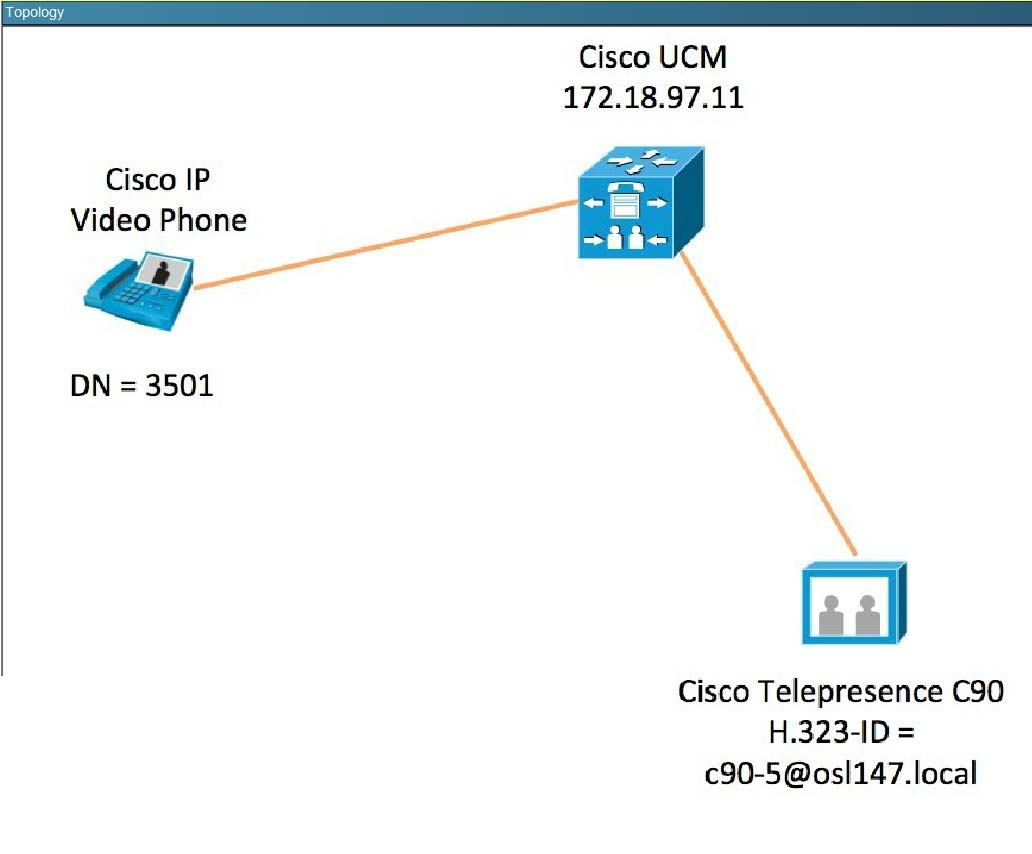
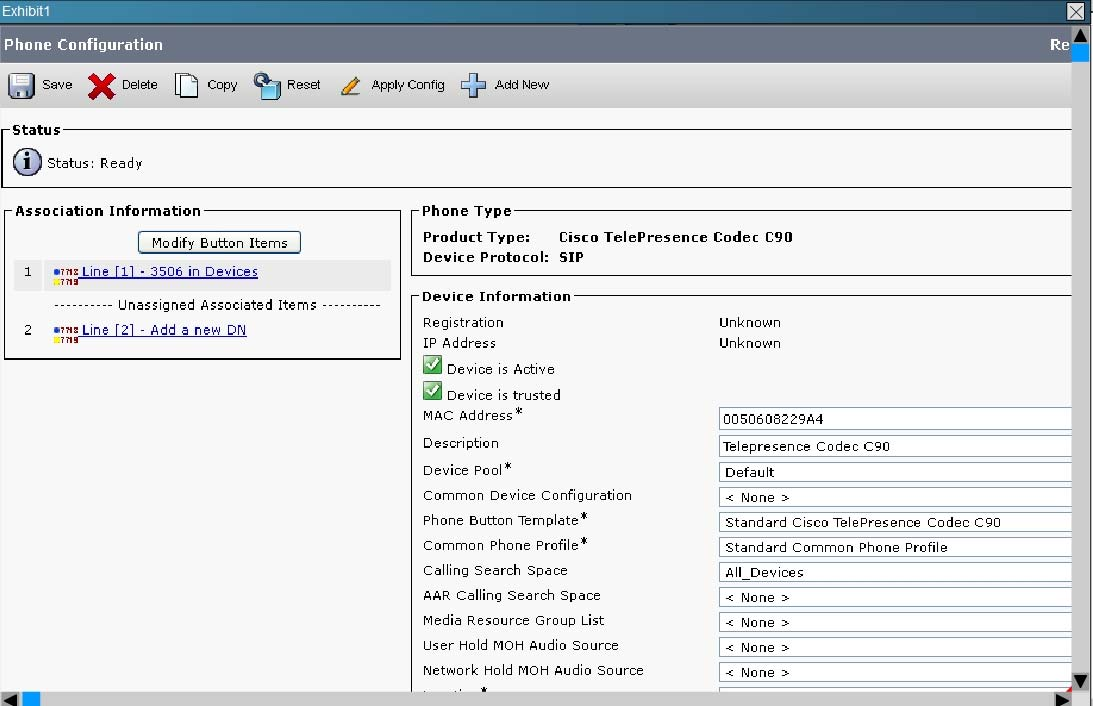
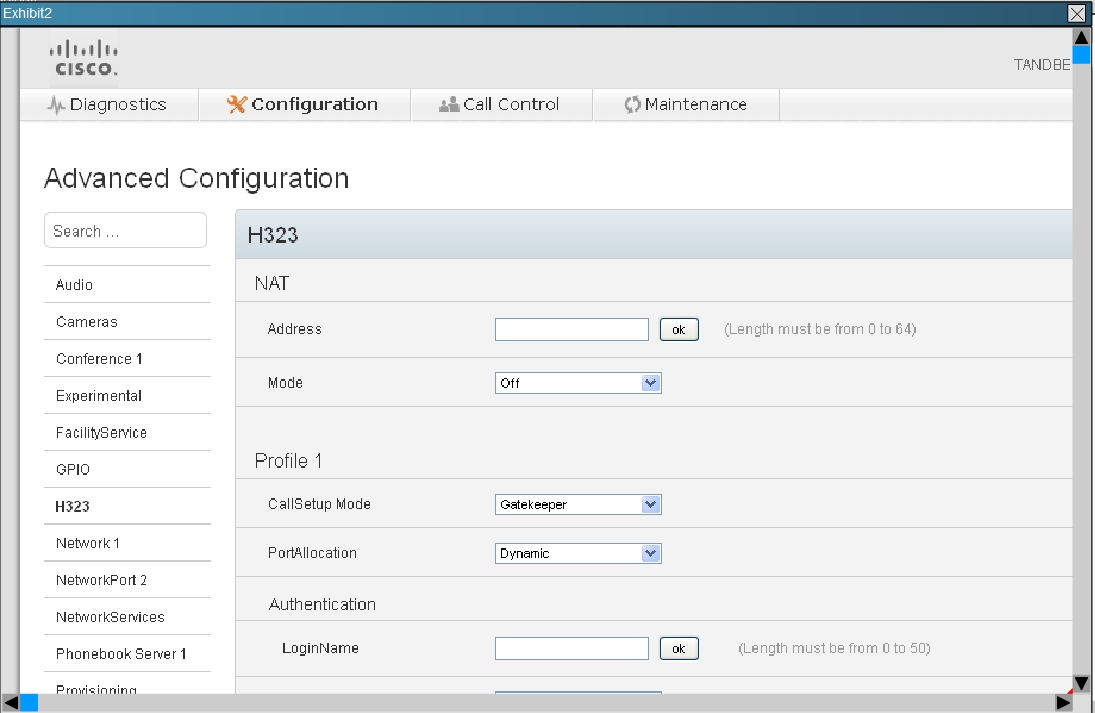
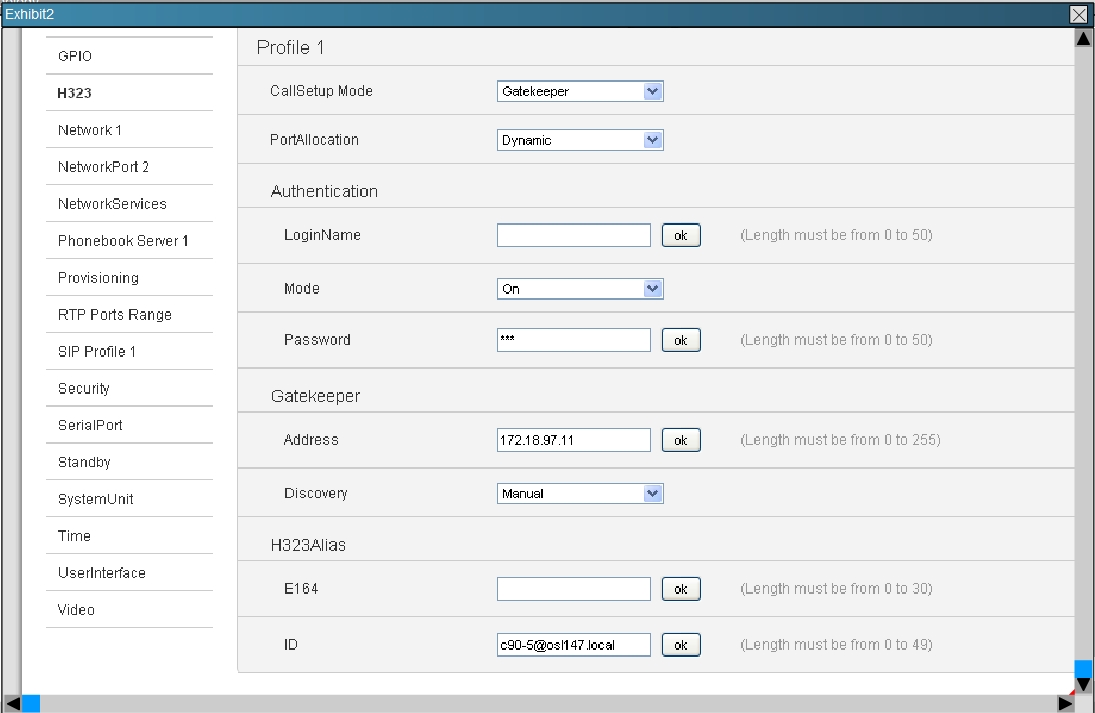
The Cisco Telepresence Codec C90 is unable to call the Cisco IP Video Phone. Assuming that the calling search space has been configured correctly, which of these can cause this issue?
- The Cisco Telepresence Codec C90 can only be registered to a Cisco Telepresence Video Communication Server.
- A multipoint control unit is required in order for the call to work.
- The Cisco Telepresence Codec C90 can only be registered as a SIP endpoint to Cisco Unified Communications Manager. H.323 is not supported.
- URI dialing has not been configured on Cisco Unified Communications Manager.
- The Cisco Telepresence Codec C90 Profile 1 > CallSetupMode must be configured as a gateway since Cisco Unified Communications Manager does not have a gatekeeper functionality.
- The Cisco Telepresence Codec C90 is not registered as a SIP endpoint on Cisco Unified Communications Manager. The Cisco Telepresence Codec C90
Correct answer: E
Question 3
In this item, you will need to use all information presented to you to successfully answer the question.
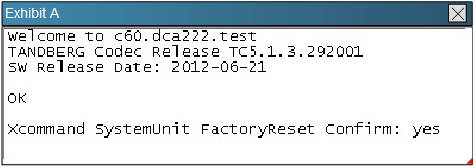
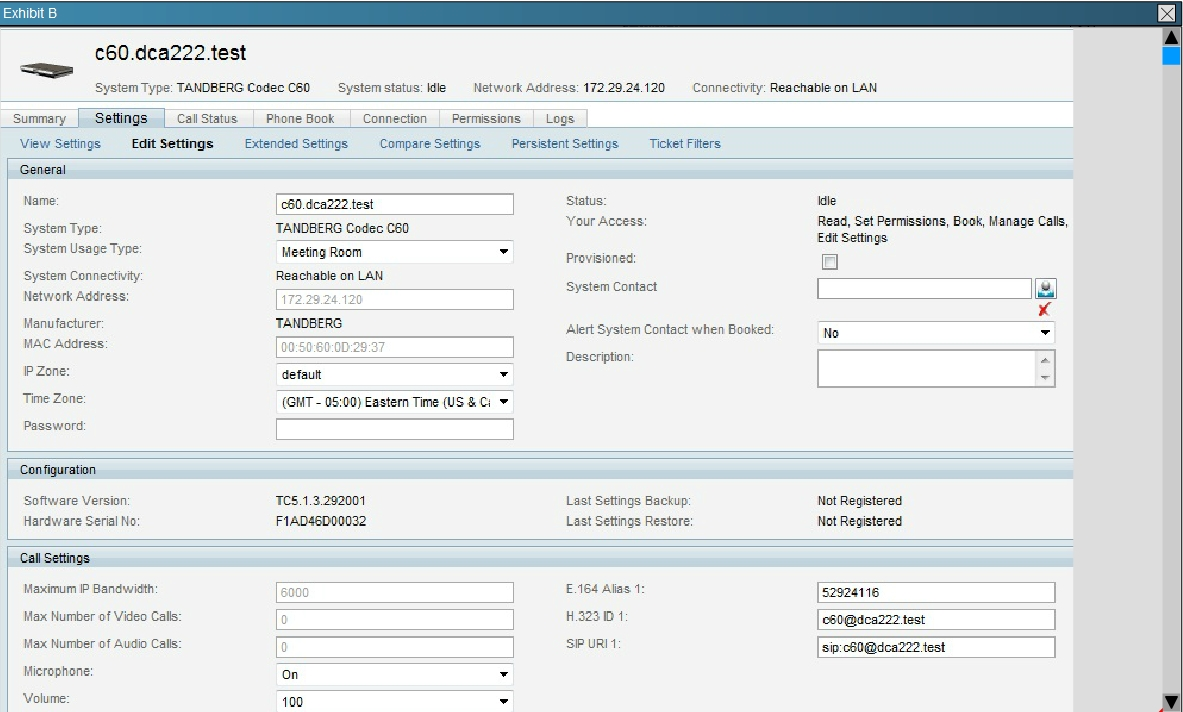
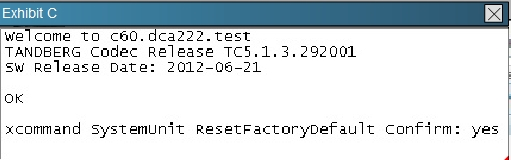
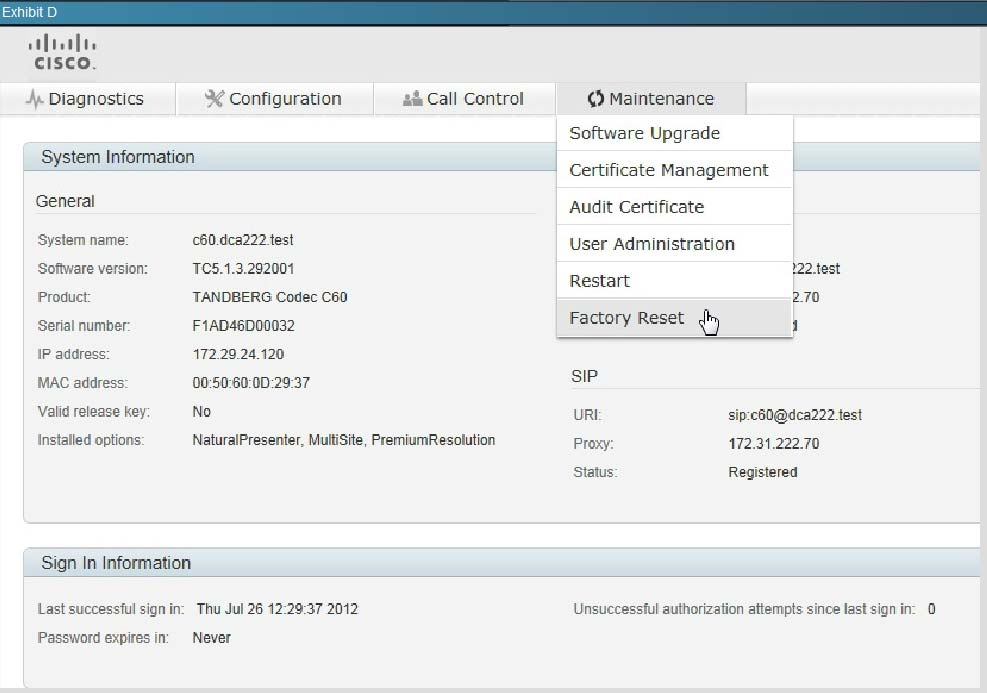
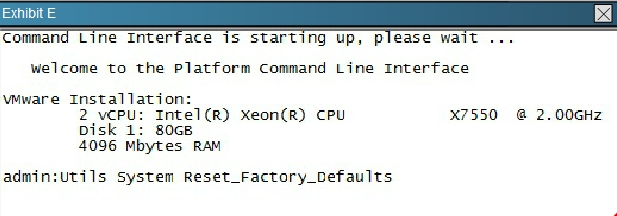
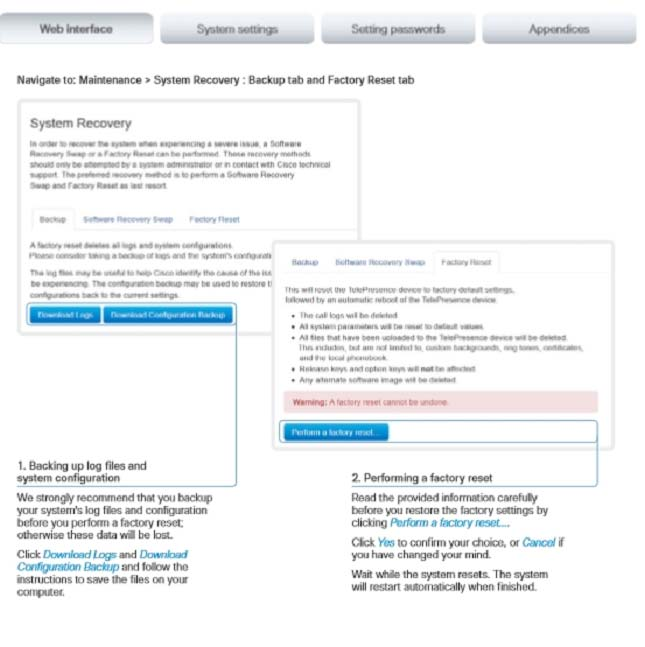
Refer to the exhibits. An administrator needs to perform a factory reset on a C-Series endpoint. What are two valid ways to accomplish this task? (Choose two.)
- Exhibit A
- Exhibit B
- Exhibit C
- Exhibit D
- Exhibit E
Correct answer: CD
Explanation:
Reference:http://www.cisco.com/c/dam/en/us/td/docs/telepresence/endpoint/profile-series/tc7/administration-guide/profile-c60-c40-and-codec-c60-c40- administrator-guide-tc70.pdfExp: System recovery: Factory reset If there is a severe problem with the video system, the last resort may be to reset it to its default factory settings. Always consider reverting to the previously used software image before performing a factory reset. In many situations this will recover the system*.A factory reset should only be performed by a system administrator or in contact with Cisco technical support. When factory resetting the video system the following happens:The call logs will be deleted.Passwords will be reset to default.All system parameters will be reset to default values.All files that have been uploaded to the system will be deleted. This includes, but is not limited to, custom backgrounds, certificates, and the favorites list (My contacts).The previous (inactive) software image will be deleted.Release keys and option keys will not be affected. The system restarts automatically after the reset. It is using the same software image as before. We strongly recommend that you backup your systems log files and configuration before you perform a factory reset. Reference:
http://www.cisco.com/c/dam/en/us/td/docs/telepresence/endpoint/profile-series/tc7/administration-guide/profile-c60-c40-and-codec-c60-c40- administrator-guide-tc70.pdf
Exp: System recovery: Factory reset If there is a severe problem with the video system, the last resort may be to reset it to its default factory settings. Always consider reverting to the previously used software image before performing a factory reset. In many situations this will recover the system*.
A factory reset should only be performed by a system administrator or in contact with Cisco technical support. When factory resetting the video system the following happens:
The call logs will be deleted.
Passwords will be reset to default.
All system parameters will be reset to default values.
All files that have been uploaded to the system will be deleted. This includes, but is not limited to, custom backgrounds, certificates, and the favorites list (My contacts).
The previous (inactive) software image will be deleted.
Release keys and option keys will not be affected. The system restarts automatically after the reset. It is using the same software image as before. We strongly recommend that you backup your systems log files and configuration before you perform a factory reset.
Question 4
What are the best practices for maintaining a high-quality video call regarding latency, jitter, and packet loss?
- 20-ms one-way delay, no jitter, no packet loss
- less than 150-ms one-way delay, 30-ms jitter, less than 3 percent packet loss
- 150- to 400-ms one-way delay, 50-ms jitter, 5 percent packet loss
- 500-ms one-way delay, 50-ms jitter, 5 percent packet loss
Correct answer: B
Question 5
A technician enters the diag system normal command for a Cisco TelePresence System endpoint. Which action must be done in the CLI before entering this command?
- Logging must be enabled.
- Calling services must be stopped.
- All forced upgrades must be cleared.
- The Telephone_Srvr service must be restarted.
Correct answer: B
Question 6
Refer to the exhibit.
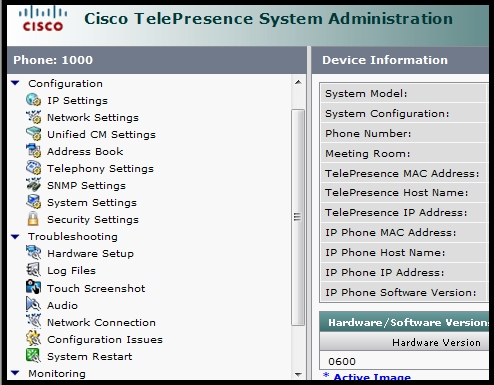
Which option performs a factory reset of a Cisco TelePresence System endpoint?
- Configuration > System Settings
- Configuration > Security Settings
- Troubleshooting > Hardware setup
- Monitoring
- Troubleshooting > Configuration Issues
- Troubleshooting > System Restart
- Cisco TelePresence System endpoint can be reset only via CLI.
Correct answer: E
Question 7
In locally managed mode, what is the maximum number of 720p HD video ports in a Cisco MSE 8710 Cisco TelePresence Server cluster running version 4.0?
- 48
- 60
- 72
- 84
- 96
- 108
Correct answer: E
Question 8
Cascading feature with TP Conductor ans TP Server has 2 limitations:
- Multi-screen endpoints are supported with more than 3 TP Server cascading
- Scheduling conference is not supported
- Ad-hoc conferencing are supported with more than 3 TP Server cascading
- Ad-hoc conference is not supported
- Only single screen endpoints supported through cascading links.
Correct answer: DE
Question 9
A customer wants to purchase a video endpoint that supports a touchscreen control. The engineer recommends a Cisco TelePresence MX300 endpoint. Which information about this endpoint should the engineer tell the customer?
- The endpoint comes with the 8-inch touchscreen by default. You can purchase the 10-inch touchscreen with an additional cost.
- The endpoint comes with the 8-inch touchscreen by default. You do not have the option to purchase the 10-inch touchscreen.
- You can purchase the endpoint with either the 8-inch touchscreen or the 10-inch touchscreen. You need an additional option key for the 10-inch touchscreen.
- The endpoint comes with the 10-inch touchscreen by default. You do not have the option to purchase the endpoint with the 8-inch touchscreen.
Correct answer: D
Explanation:
Reference:http://www.cisco.com/c/en/us/products/collateral/collaboration-endpoints/telepresence-mx-series/data-sheet-c78-729734.htmlExp: Provides touch control: The 10-inch Cisco TelePresence Touch 10 interface offers simple, intuitive control. Easy "one-button-to-push" (OBTP) calling integrates with common calendaring programs Reference:
http://www.cisco.com/c/en/us/products/collateral/collaboration-endpoints/telepresence-mx-series/data-sheet-c78-729734.html
Exp: Provides touch control: The 10-inch Cisco TelePresence Touch 10 interface offers simple, intuitive control. Easy "one-button-to-push" (OBTP) calling integrates with common calendaring programs
Question 10
An engineer is deploying a Cisco TelePresence Touch 8 controller for a Cisco TelePresence SX20. Which two steps are required as part of this process? (Choose two.)
- Connect the cable from the Touch 8 controller to the Cisco TelePresence SX20.
- Connect the Touch 8 controller to the power adapter and connect the adapter to the network.
- Connect the Touch 8 controller to the secondary network adapter on the Cisco TelePresence SX20.
- Reboot the Cisco TelePresence SX20.
- Hold the mute button down for 20 seconds while you power on the Touch 8 controller.
Correct answer: BE
HOW TO OPEN VCE FILES
Use VCE Exam Simulator to open VCE files

HOW TO OPEN VCEX FILES
Use ProfExam Simulator to open VCEX files


ProfExam at a 20% markdown
You have the opportunity to purchase ProfExam at a 20% reduced price
Get Now!