Download Implementing Cisco Collaboration Applications (CLICA).300-810.ExamTopics.2025-07-29.174q.vcex
| Vendor: | Cisco |
| Exam Code: | 300-810 |
| Exam Name: | Implementing Cisco Collaboration Applications (CLICA) |
| Date: | Jul 29, 2025 |
| File Size: | 5 MB |
How to open VCEX files?
Files with VCEX extension can be opened by ProfExam Simulator.
Purchase
Coupon: TAURUSSIM_20OFF
Discount: 20%
Demo Questions
Question 1
An administrator is configuring Cisco Unity Connection call handlers. The administrator wants to ensure that all outside callers are played a welcome message and then are transferred to a live operator. The administrator wants to restrict the callers from interrupting the welcome message with key presses. Under which call handler menu is this task accomplished?
- Greetings
- Transfer Rules
- Message Settings
- Caller Input
Correct answer: A
Explanation:
A: 3 - MostedD: 1 A: 3 - MostedD: 1
Question 2
Which two authentication methods does Integrated Windows Authentication use to validate Windows credentials? (Choose two.)
- Digest Authentication
- NTLM
- SAML
- Kerberos
- Smart Card
Correct answer: BD
Explanation:
BD: 3 - Mosted BD: 3 - Mosted
Question 3
Refer to the exhibit.
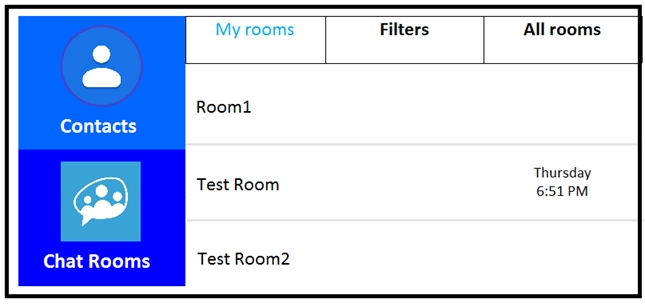
Users report that they cannot see the Chat Rooms icon on their Cisco Jabber clients. This feature works without issue in the lab. An engineer reviews the Cisco IM&P and Jabber configuration and finds that the jabber-config.xml file is configured properly to support this feature. Which activity should be performed on the IM&P server to resolve this issue?
- Activate Cisco XCP Connection Manager in Cisco Unified Serviceability > Tools > Service Activation.
- Restart Cisco XCP Message Archiver in Cisco Unified Serviceability > Tools > Control Center "" Feature Services.
- Restart XCP Text Conference Manager in Cisco Unified Serviceability > Tools > Control Center "" Network Services.
- Activate XCP Text Conference Manager in Cisco Unified Serviceability > Tools > Service Activation.
Correct answer: D
Explanation:
D: 2 - MostedReference:https://www.cisco.com/c/en/us/support/docs/unified-communications/jabber-windows/118684-probsol-chat-00.html D: 2 - Mosted
Reference:
https://www.cisco.com/c/en/us/support/docs/unified-communications/jabber-windows/118684-probsol-chat-00.html
Question 4
An administrator is setting up the Cisco Unified IM and Presence on-premises high availability feature and wants the Server Recovery Manager to initiate failover after 90 seconds. However, failover is happening after 60 seconds. How is this issue corrected?
- Change peer Heartbeat Timeout to 90 seconds.
- Change Keep Alive (Heartbeat) Interval to 90 seconds.
- Change critical service delay to 90 seconds.
- Change Keep Alive (Heartbeat) Timeout to 90 seconds.
Correct answer: D
Explanation:
D: 1 - Mosted D: 1 - Mosted
Question 5
A customer is using Cisco Unified IM and Presence with high availability and has reported that their primary node is not providing any IM and Presence services. What is causing this issue?
- The presence redundancy group node state of the primary node is "idle".
- The presence redundancy group node state of the peer node is "normal".
- The presence redundancy group node state of the primary node is "initializing".
- The presence redundancy group node state of the peer node is "running in backup mode".
Correct answer: C
Explanation:
A: 1 - Mosted A: 1 - Mosted
Question 6
A collaboration engineer is configuring LDAP integration for Cisco Unity Connection. The engineer has enabled the appropriate services and has completed the LDAP setup and LDAP directory configuration administrative pages in Cisco Unity Connection. The engineer has also completed a Full LDAP synchronization. What must the engineer do next to have the LDAP users appear in the Cisco Unity Connection Users page?
- Restart the Cisco DirSync service.
- Configure the LDAP authentication settings under LDAP – LDAP Authentication.
- Synchronize the user accounts under Users – Synch Users.
- Import the user accounts under Users – Import Users.
Correct answer: D
Explanation:
D: 3 - Mosted D: 3 - Mosted
Question 7
Refer to the exhibit.
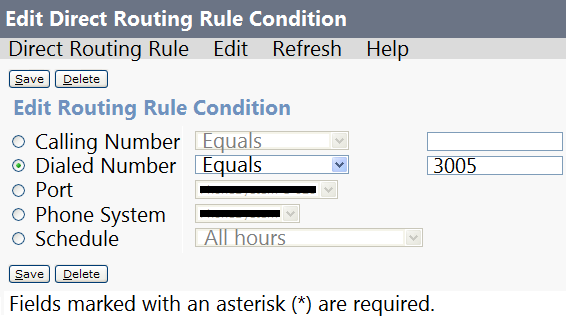
The associated directory number is configured with Call Forward All to voicemail in Cisco UCM. When users call the directory number, they hear the opening greeting. Which action should be taken to correct this issue?
- Modify the Calling Number to 3005.
- Modify the Call Forward All to the voicemail pilot.
- Modify the Dialed Number condition from “Equals” to “In”.
- Modify the rule to a Forward Routing Rule.
Correct answer: A
Explanation:
A: 1D: 1 - Mosted A: 1D: 1 - Mosted
Question 8
The persistent chat feature is configured in a Cisco Jabber deployment that is running Cisco Unified IM and Presence 11.5 SU6. Desktop clients are working, but mobile clients are not displaying persistent chats. Which configuration is necessary to enable the Jabber persistent chat feature on mobile devices?
- add the true line to the Jabber configuration file that is used by mobile devices
- add "Enable_Persistent_Chat" in the "Cisco Support Field" on the Jabber for mobile device configuration page on Cisco UCM
- add the false line to the Jabber configuration file that is used by all Jabber devices
- while logged into IM and Presence server Administration, go to "Messaging", then "Settings", and check the checkbox for the "Enable persistent chat for mobile" field
Correct answer: C
Explanation:
A: 1 - Mosted A: 1 - Mosted
Question 9
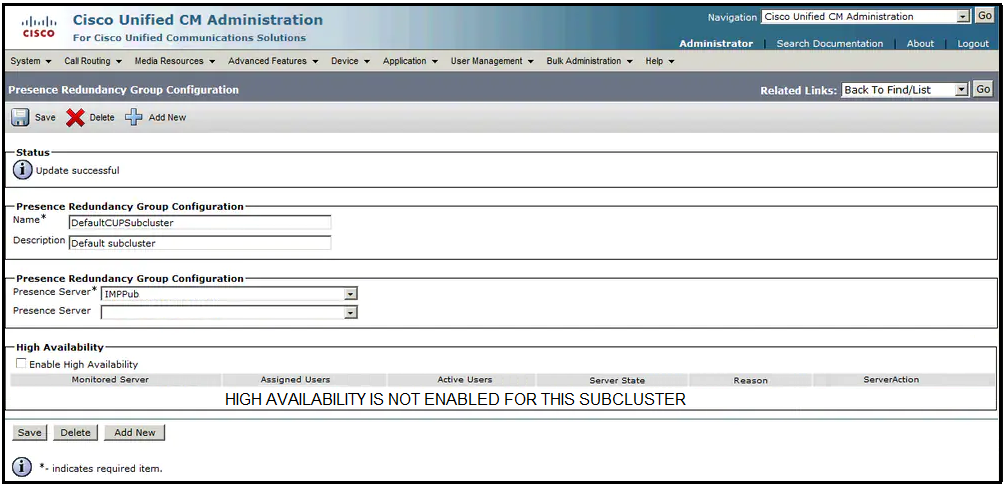
Refer to the exhibit. An engineer must configure Cisco IM and Presence server high availability so that the publisher node fails over to the subscriber node if the publisher node becomes unavailable. On the Presence Redundancy Group Configuration page, the engineer receives this message: “High availability is not enabled for this cluster.” Which two actions must the engineer perform to resolve the issue? (Choose two.)
- Add a new presence redundancy group and click Save.
- Replace IMPPub with IMPSub in the redundancy group.
- Click Save and restart the Cisco Presence Engine.
- Add IMPSub as a secondary presence server in the redundancy group.
- Select Enable High Availability and click Save.
Correct answer: DE
Explanation:
DE: 5 - Mosted DE: 5 - Mosted
Question 10
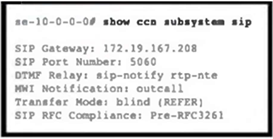
Refer to the exhibit. An administrator is configuring a Cisco Unity Express call handler. One of the options will transfer calls off-system to Cisco UCME. The administrator wants the transfer to finish while the transfer target is ringing. Which transfer-mode command completes the configuration?
- blind bye-also
- attended
- semi-attended
- blind refer
Correct answer: C
Explanation:
C: 2 - Mosted C: 2 - Mosted
Question 11
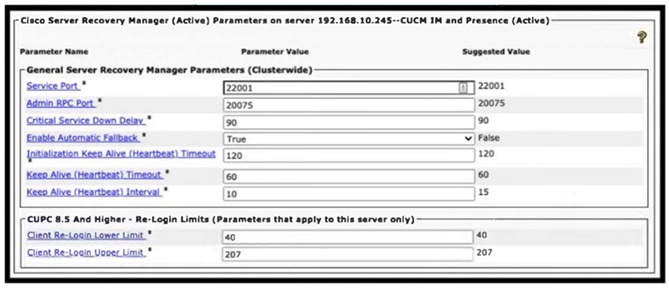
Refer to the exhibit. A collaboration engineer restored a failed primary node of an active/standby IM and Presence subcluster. The engineer notices that user fallback to the primary node has not occurred. Which action resolves this issue?
- Reboot the primary node.
- Set the Keep-Alive (Heartbeat) Interval to 15.
- Modify the Client Re-Login Limits.
- Wait for the primary node to establish 30 minutes of uptime.
Correct answer: D
Explanation:
D: 1 - Mosted D: 1 - Mosted
HOW TO OPEN VCE FILES
Use VCE Exam Simulator to open VCE files

HOW TO OPEN VCEX FILES
Use ProfExam Simulator to open VCEX files


ProfExam at a 20% markdown
You have the opportunity to purchase ProfExam at a 20% reduced price
Get Now!