Download CyberArk Sentry - Secrets Manager.SECRET-SEN.ExamTopics.2025-10-08.11q.tqb
| Vendor: | CyberArk |
| Exam Code: | SECRET-SEN |
| Exam Name: | CyberArk Sentry - Secrets Manager |
| Date: | Oct 08, 2025 |
| File Size: | 99 KB |
How to open TQB files?
Files with TQB (Taurus Question Bank) extension can be opened by Taurus Exam Studio.
Purchase
Coupon: TAURUSSIM_20OFF
Discount: 20%





Demo Questions
Question 1
When installing the Vault Conjur Synchronizer, you see this error:
Forbidden -
Logon Token is Empty – Cannot logon
Unauthorized -
What must you ensure to remediate the issue?
- This admin user must not be logged in to other sessions during the Vault Conjur Synchronizer installation process.
- You specified the correct url for Conjur and it is listed as a SAN on that url’s certificate.
- You correctly URI encoded the url in the installation script.
- You ran powershell as Administrator and there is sufficient space on the server on which you are running the installation.
Correct answer: B
Question 2
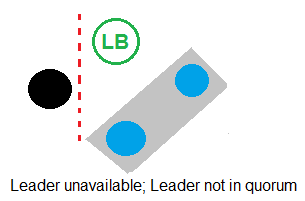
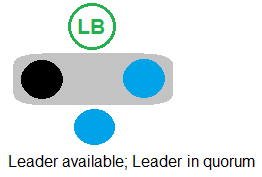
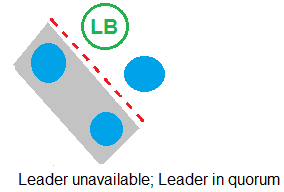
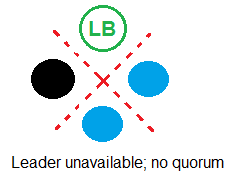
Refer to the exhibit.
In which example will auto-failover occur?

Correct answer: B
Question 3
You are setting up the Secrets Provider for Kubernetes to support rotation with Push-to-File mode.
Which deployment option should be used?
- Init container
- Application container
- Sidecar
- Service Broker
Correct answer: C
Question 4
What is the correct command to import the root CA certificate into Conjur?
- docker exec <ContainerName> evoke ca import – –no-restart – –root <rootCA.cer>
- docker exec <ContainerName> evoke import – –no-restart – –root <rootCA.cer>
- docker exec <ContainerName> evoke ca import – –no-restart <rootCA.cer>
- docker exec <ContainerName> ca import <rootCA.cer>
Correct answer: C
Explanation:
A: 1 A: 1
Question 5
During the configuration of Conjur, what is a possible deployment scenario?
- The Leader and Followers are deployed outside of a Kubernetes environment; Slandbys can run inside a Kubernetes environment.
- The Conjur Leader cluster is deployed outside of a Kubernetes environment; Followers can run inside or outside the environment,
- The Leader cluster is deployed outside a Kubernetes environment; Followers and Standbys can run inside or outside the environment.
- The Conjur Leader cluster and Followers are deployed inside a Kubernetes environment.
Correct answer: C
Question 6
Arrange the steps to configure authenticators in the correct the sequence.
Correct answer: To work with this question, an Exam Simulator is required.
Question 7
Match each scenario to the appropriate Secrets Manager solution.
Correct answer: To work with this question, an Exam Simulator is required.
Question 8
When working with Summon, what is the purpose of the secrets.yml file?
- It is where Summon outputs the secret value after retrieval.
- It is where you define which secrets to retrieve.
- It is where you store the Conjur URL and host API key.
- It is the log file for Summon.
Correct answer: B
Question 9
You are diagnosing this log entry:
From Conjur logs:
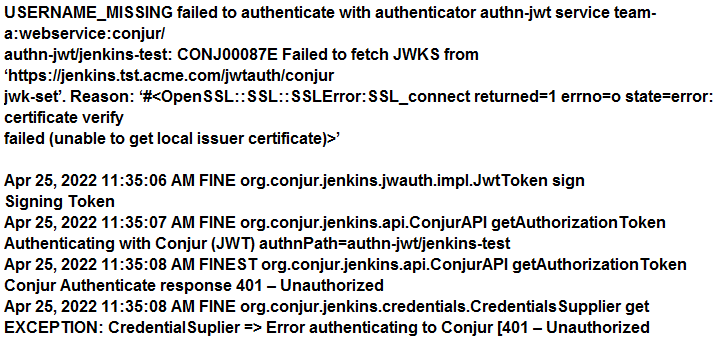
Given these errors, which problem is causing the breakdown?
- The Jenkins certificate chain is not trusted by Conjur.
- The Conjur certificate chain is not trusted by Jenkins.
- The JWT sent by Jenkins does not match the Conjur host annotations.
- The Jenkins certificate is malformed and will not be trusted by Conjur.
Correct answer: B
Question 10
You are enabling synchronous replication on Conjur cluster.
What should you do?
- Execute this command on the Leader:docker exec <container-name> sh –c”evoke replication sync that*
- Execute this command on each Standby:docker exec <container-name> sh –c”evoke replication sync that*
- In Conjur web UI, click the Tools icon in the top right corner of the main window.Choose Conjur Cluster and click “Enable synchronous replication” in the entry for Leader.
- In Conjur web UI, click the Tools icon in the top right corner of the main window.Choose Conjur Cluster and click “Enable synchronous replication” in the entry for Standbys.
Correct answer: B
HOW TO OPEN VCE FILES
Use VCE Exam Simulator to open VCE files

HOW TO OPEN VCEX FILES
Use ProfExam Simulator to open VCEX files


ProfExam at a 20% markdown
You have the opportunity to purchase ProfExam at a 20% reduced price
Get Now!