Download Dell XtremIO Deploy Achievement.D-XTR-OE-A-24.Pass4Success.2025-10-15.28q.tqb
| Vendor: | Dell |
| Exam Code: | D-XTR-OE-A-24 |
| Exam Name: | Dell XtremIO Deploy Achievement |
| Date: | Oct 15, 2025 |
| File Size: | 649 KB |
How to open TQB files?
Files with TQB (Taurus Question Bank) extension can be opened by Taurus Exam Studio.
Purchase
Coupon: TAURUSSIM_20OFF
Discount: 20%





Demo Questions
Question 1
In a heterogeneous environment, what is a recommended setting when multiple storage arrays are connected to VMware vSphere in addition to XtremIO X2?
- fnic_max_qdepth = 128
- Disk.SchedQuantum = 64
- XCOPY = 256
- Disk.SchedNumReqOustanding = 32
Correct answer: B
Explanation:
In a heterogeneous environment with multiple storage arrays connected to VMware vSphere, setting Disk.SchedQuantum to 64 is recommended.This setting optimizes the scheduling of I/O requests and helps in balancing the load across different storage arrays.Proper configuration of Disk.SchedQuantum enhances the performance and efficiency of the storage environment.VMware Best Practices for StorageDell XtremIO VMware Integration Guide In a heterogeneous environment with multiple storage arrays connected to VMware vSphere, setting Disk.SchedQuantum to 64 is recommended.
This setting optimizes the scheduling of I/O requests and helps in balancing the load across different storage arrays.
Proper configuration of Disk.SchedQuantum enhances the performance and efficiency of the storage environment.
VMware Best Practices for Storage
Dell XtremIO VMware Integration Guide
Question 2
A systems administrator wants to double the throughput on an existing dual XtremIO X1 10 TB X-Brick cluster. All hosts performing I/O to the cluster are configured and tuned according to Dell Technologies best practices.
To achieve the performance gain, what should be added?
- A single 10 TB X-Brick Expansion Kit
- A dual 20 TB X-Brick Expansion Kit
- A single 20 TB X-Brick Expansion Kit
- A dual 10 TB X-Brick Expansion Kit
Correct answer: D
Explanation:
To double the throughput on an existing dual XtremIO X1 10 TB X-Brick cluster, adding a dual 10 TB X-Brick Expansion Kit is recommended.XtremIO uses a scale-out architecture, and adding a dual X-Brick expansion will increase both storage capacity and performance.This expansion ensures balanced performance improvement and leverages the best practices configuration already in place for the existing setup.Dell XtremIO Scale-Out Performance GuideXtremIO Expansion Best Practices To double the throughput on an existing dual XtremIO X1 10 TB X-Brick cluster, adding a dual 10 TB X-Brick Expansion Kit is recommended.
XtremIO uses a scale-out architecture, and adding a dual X-Brick expansion will increase both storage capacity and performance.
This expansion ensures balanced performance improvement and leverages the best practices configuration already in place for the existing setup.
Dell XtremIO Scale-Out Performance Guide
XtremIO Expansion Best Practices
Question 3
Which file systems support UNMAP on a Linux server connected to an XtremlO cluster?
- Ext3, Ext4, and XFS
- ReiserFS, Ext4, and ZFS
- Ext4, XFS, and ZFS
- ReiserFS, Ext3, and XFS
Correct answer: A
Explanation:
For Linux servers connected to an XtremIO cluster, the file systems that support the UNMAP command include Ext3, Ext4, and XFS. The UNMAP command allows these file systems to inform the storage array about blocks that are no longer in use, facilitating better space reclamation and efficiency in storage management.Dell EMC documentation on XtremIO configurations for Linux environments confirms the support for UNMAP with these specific file systems.Linux kernel documentation also supports the use of UNMAP/TRIM operations with Ext3, Ext4, and XFS for storage optimization. For Linux servers connected to an XtremIO cluster, the file systems that support the UNMAP command include Ext3, Ext4, and XFS. The UNMAP command allows these file systems to inform the storage array about blocks that are no longer in use, facilitating better space reclamation and efficiency in storage management.
Dell EMC documentation on XtremIO configurations for Linux environments confirms the support for UNMAP with these specific file systems.
Linux kernel documentation also supports the use of UNMAP/TRIM operations with Ext3, Ext4, and XFS for storage optimization.
Question 4
What is an accurate statement regarding RecoverPoint and XtremIO?
- At least one RecoverPoint Appliance is required per X-Brick
- RecoverPoint cannot scale-up with X-Bricks by adding more RPAs
- RecoverPoint only supports homogeneous replication from XtremIO-to-XtremIO
- RecoverPoint supports synchronous and asynchronous replication of file-based storage
Correct answer: A
Explanation:
Each X-Brick in an XtremIO environment requires at least one RecoverPoint Appliance (RPA) to manage replication tasks effectively.RecoverPoint provides both synchronous and asynchronous replication, ensuring data integrity and disaster recovery capabilities.The RPA is crucial for handling replication operations and maintaining data consistency across XtremIO clusters.Dell XtremIO Integration with RecoverPoint DocumentationRaid-Zero XtremIO and RecoverPoint Initial Findings Each X-Brick in an XtremIO environment requires at least one RecoverPoint Appliance (RPA) to manage replication tasks effectively.
RecoverPoint provides both synchronous and asynchronous replication, ensuring data integrity and disaster recovery capabilities.
The RPA is crucial for handling replication operations and maintaining data consistency across XtremIO clusters.
Dell XtremIO Integration with RecoverPoint Documentation
Raid-Zero XtremIO and RecoverPoint Initial Findings
Question 5
A company requires synchronous replication from an XtremlO X1 cluster to a third-party array. Which replication solution will allow the company to perform this operation?
- RecoverPoint only
- Native XtremIO Replication
- RecoverPoint for VMs
- VPLEX with RecoverPoint
Correct answer: B
Explanation:
A single XtremIO Management Server (XMS) can manage up to 8 X-Brick clusters.For 20 XtremIO X1 clusters, the smallest number of XMS servers required to support the environment is 4.Consolidating management operations to the minimum number of XMS servers helps in simplifying administration and monitoring tasks.Dell XtremIO XMS Configuration GuideXtremIO Cluster Management Documentation A single XtremIO Management Server (XMS) can manage up to 8 X-Brick clusters.
For 20 XtremIO X1 clusters, the smallest number of XMS servers required to support the environment is 4.
Consolidating management operations to the minimum number of XMS servers helps in simplifying administration and monitoring tasks.
Dell XtremIO XMS Configuration Guide
XtremIO Cluster Management Documentation
Question 6
When creating a volume on an XtremIO X2-S array, which option can be selected?
- Thin or thick volumes
- Data block pre-allocation
- Cache enabled
- Tags
Correct answer: D
Explanation:
When creating a volume on an XtremIO X2-S array, administrators have the option to assign tags.Tags are used to organize and manage volumes more efficiently, allowing for better categorization and retrieval based on specific criteria.This feature enhances the management capabilities within the XtremIO environment, facilitating easier identification and handling of storage resources.Dell XtremIO X2-S Configuration Guide When creating a volume on an XtremIO X2-S array, administrators have the option to assign tags.
Tags are used to organize and manage volumes more efficiently, allowing for better categorization and retrieval based on specific criteria.
This feature enhances the management capabilities within the XtremIO environment, facilitating easier identification and handling of storage resources.
Dell XtremIO X2-S Configuration Guide
Question 7
When considering data movement efficiency, which type of VDI workload is best suited for high IOPS?
- Small, fixed workloads
- Large, random workloads
- Small, random workloads
- Large, fixed workloads
Correct answer: C
Explanation:
Small, random workloads are best suited for high IOPS in a VDI (Virtual Desktop Infrastructure) environment.Such workloads typically consist of numerous small I/O operations, which require a high number of IOPS to maintain performance.XtremIO's architecture is optimized for handling small, random I/O patterns efficiently, making it ideal for this type of VDI workload.Dell XtremIO VDI Best PracticesStorage Performance Fundamentals Small, random workloads are best suited for high IOPS in a VDI (Virtual Desktop Infrastructure) environment.
Such workloads typically consist of numerous small I/O operations, which require a high number of IOPS to maintain performance.
XtremIO's architecture is optimized for handling small, random I/O patterns efficiently, making it ideal for this type of VDI workload.
Dell XtremIO VDI Best Practices
Storage Performance Fundamentals
Question 8
After the volumes are created, which steps are required to provision the XtremlO volumes to the servers?
- Host configuration, RAID groups, SAN connectivity, and volumes mapping
- Host configuration, create pools, SAN connectivity, and volumes mapping
- Host configuration, SAN connectivity, encryption, and volumes mapping
- Host configuration, SAN connectivity, Initiator group, and volumes mapping
Correct answer: D
Explanation:
To provision XtremIO volumes to servers, the following steps are typically required:Host Configuration: This involves setting up the host with the necessary drivers and tools to communicate with the XtremIO storage system. It may include installing HBA drivers, multipathing software, and configuring host parameters to optimize performance1.SAN Connectivity: Establishing SAN connectivity is crucial for the host to access the XtremIO volumes. This step involves zoning in the SAN switches to ensure that the host can see the XtremIO storage controllers1.Initiator Group: An initiator group is a collection of host initiators (WWNs or IQNs) that are allowed to access a set of volumes. Creating and configuring an initiator group in the XtremIO system is necessary to control access to the volumes1.Volumes Mapping: The final step is to map the volumes to the host. This is done by associating the volumes with the initiator group that contains the host's initiators. Once mapped, the volumes will be accessible to the host for data storage and retrieval1.The other options, such as RAID groups (OA), creating pools (OB), and encryption (OC), are not directly related to the provisioning process of XtremIO volumes to servers. RAID groups and pools are typically managed within the storage system itself, while encryption is a data security feature that may be configured as part of the overall storage setup1. To provision XtremIO volumes to servers, the following steps are typically required:
Question 9
Refer to the exhibit.
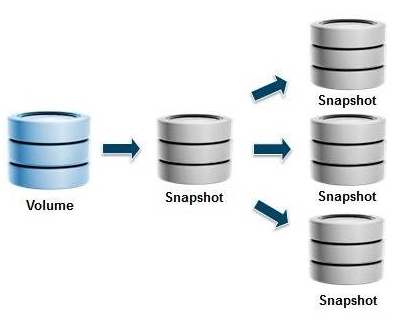
Refer to the Exhibit.
An XtremlO administrator is asked to provide a copy of a 25 TiB database to a group of users. Each user needs to have their own copy of the database in order to perform a variety of manipulations on the data. This process needs to be repeated every day of the week. The administrator is concerned about the time it will take to make the initial copy of the database and is investigating the use of snapshots of snapshots.
How does each snapshot impact its ancestor?
- Each first write to each snapshot will trigger a COFW from its ancestor
- Each first write to a block of the production volume will trigger a COFW to each child snapshot
- Each snapshot can be considered a unique volume and has no impact on its ancestor
- Each first access to each snapshot will trigger a COFA from its ancestor
Correct answer: A
Explanation:
XtremIO uses a Copy-On-Write (COFW) mechanism for snapshots. When a write is performed on a snapshot, the system checks if the data block being written to has been previously written. If it has not, it copies the original data block (from the ancestor snapshot or volume) to a new location before writing the new data to ensure data consistency. This operation only happens once per block for each snapshot, thereby minimizing the performance impact.Dell's detailed explanation of the XtremIO snapshot functionality emphasizes the efficiency of their COFW mechanism, ensuring minimal performance degradation when creating and writing to snapshots.XtremIO documentation highlights how snapshots are managed with in-memory metadata, which supports fast creation and access without substantial performance penalties. XtremIO uses a Copy-On-Write (COFW) mechanism for snapshots. When a write is performed on a snapshot, the system checks if the data block being written to has been previously written. If it has not, it copies the original data block (from the ancestor snapshot or volume) to a new location before writing the new data to ensure data consistency. This operation only happens once per block for each snapshot, thereby minimizing the performance impact.
Dell's detailed explanation of the XtremIO snapshot functionality emphasizes the efficiency of their COFW mechanism, ensuring minimal performance degradation when creating and writing to snapshots.
XtremIO documentation highlights how snapshots are managed with in-memory metadata, which supports fast creation and access without substantial performance penalties.
Question 10
Which non-optimal configuration may have a significant effect on write operations on a Linux server connected to XtremIO?
- Misaligned data to the 4k boundaries
- Misaligned data to the 8k boundaries
- Misaligned data to the 32k boundaries
- Misaligned data to the 16k boundaries
Correct answer: D
Explanation:
To provision XtremIO volumes to servers, the following steps are typically required:Host Configuration: This involves setting up the host with the necessary drivers and tools to communicate with the XtremIO storage system. It may include installing HBA drivers, multipathing software, and configuring host parameters to optimize performance1.SAN Connectivity: Establishing SAN connectivity is crucial for the host to access the XtremIO volumes. This step involves zoning in the SAN switches to ensure that the host can see the XtremIO storage controllers1.Initiator Group: An initiator group is a collection of host initiators (WWNs or IQNs) that are allowed to access a set of volumes. Creating and configuring an initiator group in the XtremIO system is necessary to control access to the volumes1.Volumes Mapping: The final step is to map the volumes to the host. This is done by associating the volumes with the initiator group that contains the host's initiators. Once mapped, the volumes will be accessible to the host for data storage and retrieval1.The other options, such as RAID groups (OA), creating pools (OB), and encryption (OC), are not directly related to the provisioning process of XtremIO volumes to servers. RAID groups and pools are typically managed within the storage system itself, while encryption is a data security feature that may be configured as part of the overall storage setup1. To provision XtremIO volumes to servers, the following steps are typically required:
HOW TO OPEN VCE FILES
Use VCE Exam Simulator to open VCE files

HOW TO OPEN VCEX FILES
Use ProfExam Simulator to open VCEX files


ProfExam at a 20% markdown
You have the opportunity to purchase ProfExam at a 20% reduced price
Get Now!