Download Fortinet FCP-FortiAuthenticator 6.5 Administrator.FCP_FAC_AD-6.5.Braindump2go.2025-10-28.15q.tqb
| Vendor: | Fortinet |
| Exam Code: | FCP_FAC_AD-6.5 |
| Exam Name: | Fortinet FCP-FortiAuthenticator 6.5 Administrator |
| Date: | Oct 28, 2025 |
| File Size: | 282 KB |
How to open TQB files?
Files with TQB (Taurus Question Bank) extension can be opened by Taurus Exam Studio.
Purchase
Coupon: TAURUSSIM_20OFF
Discount: 20%





Demo Questions
Question 1
Which three of the following can be used as SSO sources? (Choose three.)
- RADIUS accounting
- FortiClient SSO Mobility Agent
- SSH sessions
- FortiGate
- FortiAuthenticator in SAML SP role
Correct answer: ABD
Explanation:
RADIUS accounting can be used by FortiAuthenticator to obtain user identity and session details for SSO.FortiClient SSO Mobility Agent reports user login events to FortiAuthenticator for SSO.FortiGate can act as an SSO source by sending user authentication information to FortiAuthenticator. RADIUS accounting can be used by FortiAuthenticator to obtain user identity and session details for SSO.
FortiClient SSO Mobility Agent reports user login events to FortiAuthenticator for SSO.
FortiGate can act as an SSO source by sending user authentication information to FortiAuthenticator.
Question 2
You have implemented two-factor authentication to enhance security to sensitive enterprise systems.
How could you bypass the need for two-factor authentication for users accessing form specific secured networks?
- Enable Adaptive Authentication in the portal policy.
- Specify the appropriate RADIUS clients in the authentication policy.
- Create an admin realm in the authentication policy.
- Enable the Resolve user geolocation from their IP address option in the authentication policy
Correct answer: A
Explanation:
Enabling Adaptive Authentication in the portal policy allows FortiAuthenticator to apply contextual rules, such as bypassing two-factor authentication when users connect from specific secured networks. Enabling Adaptive Authentication in the portal policy allows FortiAuthenticator to apply contextual rules, such as bypassing two-factor authentication when users connect from specific secured networks.
Question 3
When configuring an active-passive HA deployment, what is the recommended data synchronization path?
- Dedicated fiber channel
- Same VLAN
- Dedicated point-to-point VPN connection
- Direct cable connection
Correct answer: D
Explanation:
A direct cable connection is the recommended data synchronization path in an active-passive HA deployment because it provides the fastest, most reliable, and secure method for synchronizing data between FortiAuthenticator units without depending on external network infrastructure. A direct cable connection is the recommended data synchronization path in an active-passive HA deployment because it provides the fastest, most reliable, and secure method for synchronizing data between FortiAuthenticator units without depending on external network infrastructure.
Question 4
Which FSSO discovery method transparently detects logged off users without having to rely on external features such as WMI polling?
- RADIUS accounting
- FortiClient SSO mobility agent
- DC polling
- Windows AD polling
Correct answer: B
Explanation:
The FortiClient SSO Mobility Agent runs on the endpoint and communicates login and logoff events directly to FortiAuthenticator, allowing transparent detection of logged-off users without relying on external mechanisms like WMI polling. The FortiClient SSO Mobility Agent runs on the endpoint and communicates login and logoff events directly to FortiAuthenticator, allowing transparent detection of logged-off users without relying on external mechanisms like WMI polling.
Question 5
When performing a remote LDAP server integration with FortiAuthenticator, how do server type templates assist with the integration?
- They autopopulate the simple and regular bind settings.
- They automatically set the LDAP user auto provisioning settings.
- They populate the query element fields with defined attribute and class values.
- They define the connection security and domain authentication settings for each LDAP server you integrate with.
Correct answer: C
Explanation:
Server type templates in FortiAuthenticator assist LDAP integration by prepopulating the query element fields with the correct attribute and class values for the selected LDAP server type, simplifying configuration and ensuring accurate directory queries. Server type templates in FortiAuthenticator assist LDAP integration by prepopulating the query element fields with the correct attribute and class values for the selected LDAP server type, simplifying configuration and ensuring accurate directory queries.
Question 6
Which two data items are not synchronized in an active-active HA deployment? (Choose two.)
- Group mappings
- User certificates
- FSSO events
- Seeds
Correct answer: CD
Explanation:
In an active-active HA deployment, FSSO events and seeds are not synchronized between FortiAuthenticator units, as these are instance-specific and typically handled locally on each node. In an active-active HA deployment, FSSO events and seeds are not synchronized between FortiAuthenticator units, as these are instance-specific and typically handled locally on each node.
Question 7
Refer to the exhibit.
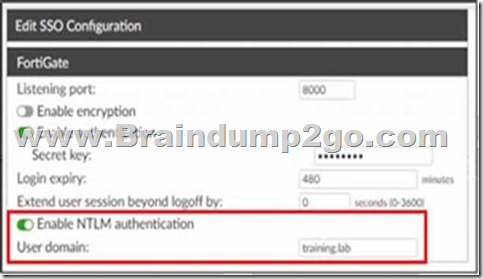
Which functionality does the Enable NTLM option provide?
- It allows FortiAuthenticator to message end users using the FortiClient for SSO.
- It forces FortiClient users to use two-factor authentication when using FortiClient for SSO.
- It prevents users from authenticating to an unauthorized AD server.
- It enables tracking and recording all authentications performed through FortiClient.
Correct answer: C
Explanation:
Enabling NTLM authentication in this FortiAuthenticator SSO configuration ensures that user authentication requests are validated against the specified domain, preventing users from authenticating to an unauthorized Active Directory server. Enabling NTLM authentication in this FortiAuthenticator SSO configuration ensures that user authentication requests are validated against the specified domain, preventing users from authenticating to an unauthorized Active Directory server.
Question 8
You are a FortiAuthenticator administrator for a large organization. Users who are configured to use FortiToken 200 for two-factor authentication can no longer authenticate. You have verified that only the users with two-factor authentication are experiencing the issue.
What can cause this issue?
- Time drift between FortiAuthenticator and hardware tokens
- The seed value on the tokens was incorrectly updated
- Token certificate was added to a CRL
- FortiAuthenticator has lost contact with the FortiCloud token provisioning servers
Correct answer: A
Explanation:
If there is time drift between FortiAuthenticator and FortiToken 200 hardware tokens, the one-time passwords generated will no longer match the expected values, causing all two-factor authentication attempts to fail for affected users. If there is time drift between FortiAuthenticator and FortiToken 200 hardware tokens, the one-time passwords generated will no longer match the expected values, causing all two-factor authentication attempts to fail for affected users.
Question 9
A network administrator is using FortiAuthenticator as their RADIUS server for wired and wireless network access. The administrator wants to pass the users’ group information back to the RADIUS clients when the users authenticate.
How does FortiAuthenticator accomplish this?
- RADIUS attributes
- RADIUS accounting
- Syslog messages
- REST API
Correct answer: A
Explanation:
FortiAuthenticator uses RADIUS attributes to pass additional information, such as user group membership, back to RADIUS clients during the authentication process. FortiAuthenticator uses RADIUS attributes to pass additional information, such as user group membership, back to RADIUS clients during the authentication process.
Question 10
Refer to the exhibits.
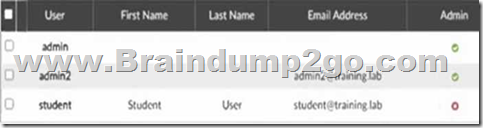
Event Log
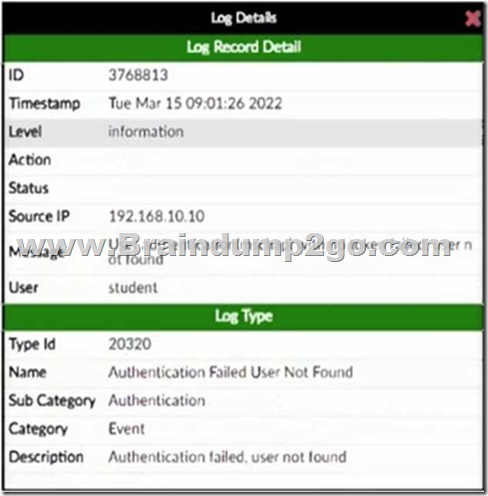
Event Detail
An administrator has configured several wireless APs to use FortiAuthenticator as their RADIUS server. One user is unable to successfully authenticate. The user record exists in the system, but the FortiAuthenticator log shows Authentication failed, user not found.
What is the most likely cause of the problem?
- The RADIUS traffic is being sourced from an IP address not listed as NAS.
- No client entry exists for the authenticating AP.
- The RADIUS secret is incorrect.
- RADIUS authentication is not enabled for the user.
Correct answer: D
Explanation:
The log message indicates that FortiAuthenticator cannot find the user during RADIUS authentication, even though the user exists in the system. This typically happens when RADIUS authentication is not enabled for that user account, preventing FortiAuthenticator from using it for RADIUS login requests. The log message indicates that FortiAuthenticator cannot find the user during RADIUS authentication, even though the user exists in the system. This typically happens when RADIUS authentication is not enabled for that user account, preventing FortiAuthenticator from using it for RADIUS login requests.
HOW TO OPEN VCE FILES
Use VCE Exam Simulator to open VCE files

HOW TO OPEN VCEX FILES
Use ProfExam Simulator to open VCEX files


ProfExam at a 20% markdown
You have the opportunity to purchase ProfExam at a 20% reduced price
Get Now!