Download Aruba Certified Network Security Associate Exam.HPE6-A78.Pass4Success.2026-01-25.62q.vcex
| Vendor: | HP |
| Exam Code: | HPE6-A78 |
| Exam Name: | Aruba Certified Network Security Associate Exam |
| Date: | Jan 25, 2026 |
| File Size: | 778 KB |
How to open VCEX files?
Files with VCEX extension can be opened by ProfExam Simulator.
Purchase
Coupon: TAURUSSIM_20OFF
Discount: 20%
Demo Questions
Question 1
Refer to the exhibit, which shows the current network topology.
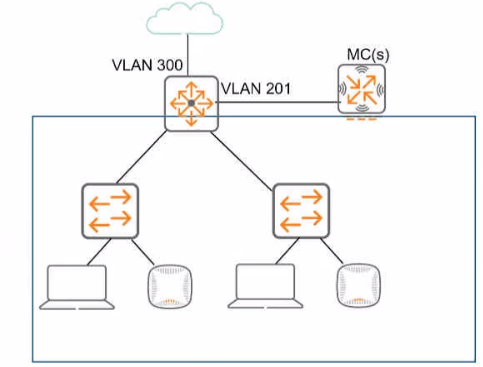
You are deploying a new wireless solution with an Aruba Mobility Master (MM). Aruba Mobility Controllers (MCs). and campus APs (CAPs). The solution will Include a WLAN that uses Tunnel for the forwarding mode and Implements WPA3-Enterprise security
What is a guideline for setting up the vlan for wireless devices connected to the WLAN?
- Assign the WLAN to a single new VLAN which is dedicated to wireless users
- Use wireless user roles to assign the devices to different VLANs in the 100-150 range
- Assign the WLAN to a named VLAN which specified 100-150 as the range of IDs.
- Use wireless user roles to assign the devices to a range of new vlan IDs.
Correct answer: B
Explanation:
When setting up VLANs for a wireless solution with an Aruba Mobility Master (MM), Aruba Mobility Controllers (MCs), and campus APs (CAPs), it is recommended to use wireless user roles to assign devices to different VLANs. This allows for greater flexibility and control over network resources and policies applied to different user groups. Wireless user roles can dynamically assign devices to the appropriate VLAN based on a variety of criteria such as user identity, device type, location, and the resources they need to access. This approach aligns with the ArubaOS features that leverage user roles for network access control, as detailed in Aruba's configuration and administration guides. When setting up VLANs for a wireless solution with an Aruba Mobility Master (MM), Aruba Mobility Controllers (MCs), and campus APs (CAPs), it is recommended to use wireless user roles to assign devices to different VLANs. This allows for greater flexibility and control over network resources and policies applied to different user groups. Wireless user roles can dynamically assign devices to the appropriate VLAN based on a variety of criteria such as user identity, device type, location, and the resources they need to access. This approach aligns with the ArubaOS features that leverage user roles for network access control, as detailed in Aruba's configuration and administration guides.
Question 2
An MC has a WLAN that enforces WPA3-Enterprise with authentication to HPE Aruba Networking ClearPass Policy Manager (CPPM). The WLAN's default role is set to guest. A Mobility Controller (MC) has these roles configured on it:
- authenticated
- denyall
- guest
- general-access
- guest-logon
- logon
- stateful-dot1x
- switch-logon
- voice
A client authenticates. CPPM returns an Access-Accept with an Aruba-User-Role VSA set to general_access. What role does the client receive?
- guest
- logon
- general-access
- authenticated
Correct answer: C
Explanation:
In an AOS-8 Mobility Controller (MC) environment, a WLAN is configured with WPA3-Enterprise security, using HPE Aruba Networking ClearPass Policy Manager (CPPM) for authentication. The WLAN's default role is set to 'guest,' which would be applied if no specific role is assigned after authentication. The MC has several roles configured, including 'general-access' (note the underscore in the question : 'general_access').The client successfully authenticates, and CPPM sends an Access-Accept message with an Aruba-User-Role Vendor-Specific Attribute (VSA) set to 'general_access.' In AOS-8, the Aruba-User-Role VSA is used to assign a specific role to the client, overriding the default role configured on the WLAN. The role specified in the VSA must match a role that exists on the MC. Since 'general-access' (or 'general_access' as written in the question) is listed among the roles configured on the MC, the MC will apply this role to the client.The underscore in 'general_access' in the VSA versus the hyphen in 'general-access' in the MC's role list is likely a typographical inconsistency in the question. In practice, AOS-8 role names are case-insensitive and typically use hyphens, not underscores, but for the purpose of this question, we assume 'general_access' matches 'general-access' as the intended role.Option A, 'guest,' is incorrect because the guest role is the default 802.1X role for the WLAN, but it is overridden by the Aruba-User-Role VSA specifying 'general_access.'Option B, 'logon,' is incorrect because the logon role is typically applied during the authentication process (e.g., to allow access to DNS or RADIUS servers), not after successful authentication when a specific role is assigned.Option C, 'general-access,' is correct because the MC applies the role specified in the Aruba-User-Role VSA ('general_access'), which matches the 'general-access' role configured on the MC.Option D, 'authenticated,' is incorrect because the 'authenticated' role is not specified in the VSA, and there is no indication that it is the default role for successful authentication in this scenario.The HPE Aruba Networking AOS-8 8.11 User Guide states:'When a client authenticates successfully via 802.1X, the Mobility Controller checks for an Aruba-User-Role VSA in the RADIUS Access-Accept message. If the VSA is present and the specified role exists on the controller, the controller assigns that role to the client, overriding the default 802.1X role configured for the WLAN. For example, if the VSA specifies 'general-access' and this role is configured on the controller, the client will be assigned the 'general-access' role.' (Page 305, Role Assignment Section)Additionally, the HPE Aruba Networking ClearPass Policy Manager 6.11 User Guide notes:'The Aruba-User-Role VSA allows ClearPass to assign a specific role to a client on an Aruba Mobility Controller. The role name sent in the VSA must match a role configured on the controller, and the controller will apply this role to the client session, ignoring the default role for the WLAN.' (Page 289, RADIUS Enforcement Section):HPE Aruba Networking AOS-8 8.11 User Guide, Role Assignment Section, Page 305.HPE Aruba Networking ClearPass Policy Manager 6.11 User Guide, RADIUS Enforcement Section, Page 289.=========== In an AOS-8 Mobility Controller (MC) environment, a WLAN is configured with WPA3-Enterprise security, using HPE Aruba Networking ClearPass Policy Manager (CPPM) for authentication. The WLAN's default role is set to 'guest,' which would be applied if no specific role is assigned after authentication. The MC has several roles configured, including 'general-access' (note the underscore in the question : 'general
_access').
The client successfully authenticates, and CPPM sends an Access-Accept message with an Aruba-User-Role Vendor-Specific Attribute (VSA) set to 'general_access.' In AOS-8, the Aruba-User-Role VSA is used to assign a specific role to the client, overriding the default role configured on the WLAN. The role specified in the VSA must match a role that exists on the MC. Since 'general-access' (or 'general_access' as written in the question) is listed among the roles configured on the MC, the MC will apply this role to the client.
The underscore in 'general_access' in the VSA versus the hyphen in 'general-access' in the MC's role list is likely a typographical inconsistency in the question. In practice, AOS-8 role names are case-insensitive and typically use hyphens, not underscores, but for the purpose of this question, we assume 'general_access' matches 'general-access' as the intended role.
Option A, 'guest,' is incorrect because the guest role is the default 802.1X role for the WLAN, but it is overridden by the Aruba-User-Role VSA specifying 'general_access.'
Option B, 'logon,' is incorrect because the logon role is typically applied during the authentication process (e.g., to allow access to DNS or RADIUS servers), not after successful authentication when a specific role is assigned.
Option C, 'general-access,' is correct because the MC applies the role specified in the Aruba-User-Role VSA ('general_access'), which matches the 'general-access' role configured on the MC.
Option D, 'authenticated,' is incorrect because the 'authenticated' role is not specified in the VSA, and there is no indication that it is the default role for successful authentication in this scenario.
The HPE Aruba Networking AOS-8 8.11 User Guide states:
'When a client authenticates successfully via 802.1X, the Mobility Controller checks for an Aruba-User-Role VSA in the RADIUS Access-Accept message. If the VSA is present and the specified role exists on the controller, the controller assigns that role to the client, overriding the default 802.1X role configured for the WLAN. For example, if the VSA specifies 'general-access' and this role is configured on the controller, the client will be assigned the 'general-access' role.' (Page 305, Role Assignment Section)
Additionally, the HPE Aruba Networking ClearPass Policy Manager 6.11 User Guide notes:
'The Aruba-User-Role VSA allows ClearPass to assign a specific role to a client on an Aruba Mobility Controller. The role name sent in the VSA must match a role configured on the controller, and the controller will apply this role to the client session, ignoring the default role for the WLAN.' (Page 289, RADIUS Enforcement Section)
:
HPE Aruba Networking AOS-8 8.11 User Guide, Role Assignment Section, Page 305.
HPE Aruba Networking ClearPass Policy Manager 6.11 User Guide, RADIUS Enforcement Section, Page 289.
===========
Question 3
What is a benefit of Opportunistic Wireless Encryption (OWE)?
- It allows both WPA2-capable and WPA3-capable clients to authenticate to the same WPA-Personal WLAN.
- It offers more control over who can connect to the wireless network when compared with WPA2-Personal.
- It allows anyone to connect, but provides better protection against eavesdropping than a traditional open network.
- It provides protection for wireless clients against both honeypot APs and man-in-the-middle (MITM) attacks.
Correct answer: C
Explanation:
Opportunistic Wireless Encryption (OWE) is a WPA3 feature designed for open wireless networks, where no password or authentication is required to connect. OWE enhances security by providing encryption for devices that support it, without requiring a pre-shared key (PSK) or 802.1X authentication.Option C, 'It allows anyone to connect, but provides better protection against eavesdropping than a traditional open network,' is correct. In a traditional open network (no encryption), all traffic is sent in plaintext, making it vulnerable to eavesdropping. OWE allows anyone to connect (as it's an open network), but it negotiates unique encryption keys for each client using a Diffie-Hellman key exchange. This ensures that client traffic is encrypted with AES (e.g., using AES-GCMP), protecting it from eavesdropping. OWE in transition mode also supports non-OWE devices, which connect without encryption, but OWE-capable devices benefit from the added security.Option A, 'It allows both WPA2-capable and WPA3-capable clients to authenticate to the same WPA-Personal WLAN,' is incorrect. OWE is for open networks, not WPA-Personal (which uses a PSK). WPA2/WPA3 transition mode (not OWE) allows both WPA2 and WPA3 clients to connect to the same WPA-Personal WLAN.Option B, 'It offers more control over who can connect to the wireless network when compared with WPA2-Personal,' is incorrect. OWE is an open network protocol, meaning it offers less control over who can connect compared to WPA2-Personal, which requires a PSK for access.Option D, 'It provides protection for wireless clients against both honeypot APs and man-in-the-middle (MITM) attacks,' is incorrect. OWE provides encryption to prevent eavesdropping, but it does not protect against honeypot APs (rogue APs broadcasting the same SSID) or MITM attacks, as it lacks authentication mechanisms to verify the AP's identity. Protection against such attacks requires 802.1X authentication (e.g., WPA3-Enterprise) or other security measures.The HPE Aruba Networking AOS-8 8.11 User Guide states:'Opportunistic Wireless Encryption (OWE) is a WPA3 feature for open networks that allows anyone to connect without a password, but provides better protection against eavesdropping than a traditional open network. OWE uses a Diffie-Hellman key exchange to negotiate unique encryption keys for each client, ensuring that traffic is encrypted with AES-GCMP and protected from unauthorized interception.' (Page 290, OWE Overview Section)Additionally, the HPE Aruba Networking Wireless Security Guide notes:'OWE enhances security for open WLANs by providing encryption without requiring authentication. It allows any device to connect, but OWE-capable devices benefit from encrypted traffic, offering better protection against eavesdropping compared to a traditional open network where all traffic is sent in plaintext.' (Page 35, OWE Benefits Section):HPE Aruba Networking AOS-8 8.11 User Guide, OWE Overview Section, Page 290.HPE Aruba Networking Wireless Security Guide, OWE Benefits Section, Page 35.=========== Opportunistic Wireless Encryption (OWE) is a WPA3 feature designed for open wireless networks, where no password or authentication is required to connect. OWE enhances security by providing encryption for devices that support it, without requiring a pre-shared key (PSK) or 802.1X authentication.
Option C, 'It allows anyone to connect, but provides better protection against eavesdropping than a traditional open network,' is correct. In a traditional open network (no encryption), all traffic is sent in plaintext, making it vulnerable to eavesdropping. OWE allows anyone to connect (as it's an open network), but it negotiates unique encryption keys for each client using a Diffie-Hellman key exchange. This ensures that client traffic is encrypted with AES (e.g., using AES-GCMP), protecting it from eavesdropping. OWE in transition mode also supports non-OWE devices, which connect without encryption, but OWE-capable devices benefit from the added security.
Option A, 'It allows both WPA2-capable and WPA3-capable clients to authenticate to the same WPA-Personal WLAN,' is incorrect. OWE is for open networks, not WPA-Personal (which uses a PSK). WPA2/WPA3 transition mode (not OWE) allows both WPA2 and WPA3 clients to connect to the same WPA-Personal WLAN.
Option B, 'It offers more control over who can connect to the wireless network when compared with WPA2-Personal,' is incorrect. OWE is an open network protocol, meaning it offers less control over who can connect compared to WPA2-Personal, which requires a PSK for access.
Option D, 'It provides protection for wireless clients against both honeypot APs and man-in-the-middle (MITM) attacks,' is incorrect. OWE provides encryption to prevent eavesdropping, but it does not protect against honeypot APs (rogue APs broadcasting the same SSID) or MITM attacks, as it lacks authentication mechanisms to verify the AP's identity. Protection against such attacks requires 802.1X authentication (e.g., WPA3-Enterprise) or other security measures.
The HPE Aruba Networking AOS-8 8.11 User Guide states:
'Opportunistic Wireless Encryption (OWE) is a WPA3 feature for open networks that allows anyone to connect without a password, but provides better protection against eavesdropping than a traditional open network. OWE uses a Diffie-Hellman key exchange to negotiate unique encryption keys for each client, ensuring that traffic is encrypted with AES-GCMP and protected from unauthorized interception.' (Page 290, OWE Overview Section)
Additionally, the HPE Aruba Networking Wireless Security Guide notes:
'OWE enhances security for open WLANs by providing encryption without requiring authentication. It allows any device to connect, but OWE-capable devices benefit from encrypted traffic, offering better protection against eavesdropping compared to a traditional open network where all traffic is sent in plaintext.' (Page 35, OWE Benefits Section)
:
HPE Aruba Networking AOS-8 8.11 User Guide, OWE Overview Section, Page 290.
HPE Aruba Networking Wireless Security Guide, OWE Benefits Section, Page 35.
===========
Question 4
Refer to the exhibit.
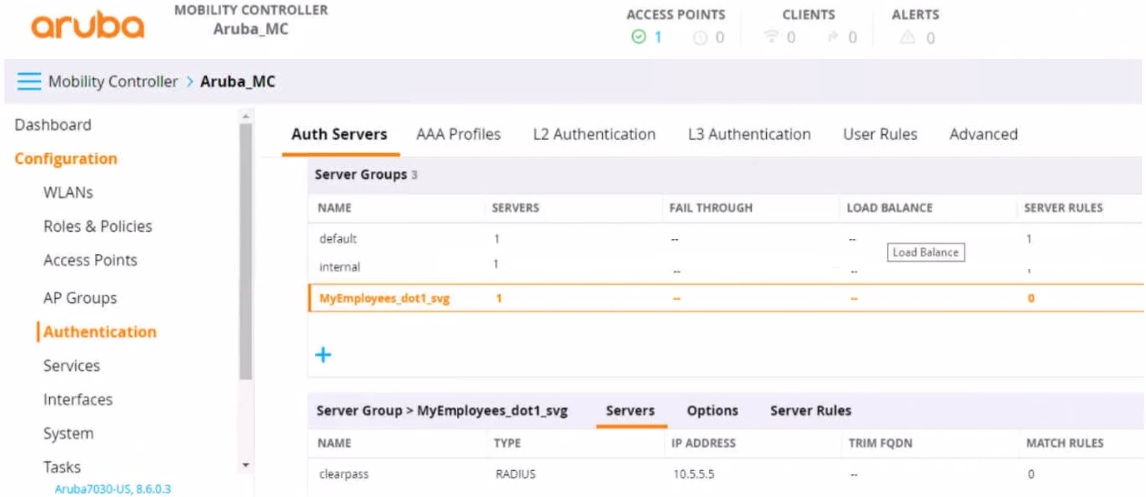
You have set up a RADIUS server on an ArubaOS Mobility Controller (MC) when you created a WLAN named "MyEmployees .You now want to enable the MC to accept change of authorization (CoA) messages from this server for wireless sessions on this WLAN.
What Is a part of the setup on the MC?
- Create a dynamic authorization, or RFC 3576, server with the 10.5.5.5 address and correct shared secret.
- Install the root CA associated with the 10 5.5.5 server's certificate as a Trusted CA certificate.
- Configure a ClearPass username and password in the MyEmployees AAA profile.
- Enable the dynamic authorization setting in the 'clearpass' authentication server settings.
Correct answer: A
Explanation:
To enable an ArubaOS Mobility Controller (MC) to accept Change of Authorization (CoA) messages from a RADIUS server for wireless sessions on a WLAN, part of the setup on the MC involves creating a dynamic authorization, or RFC 3576, server with the provided IP address (10.5.5.5) and the correct shared secret. This setup allows the MC to handle CoA requests, which are used to change the authorization attributes of a session after it has been authenticated, such as disconnecting a user or changing a user's VLAN assignment. To enable an ArubaOS Mobility Controller (MC) to accept Change of Authorization (CoA) messages from a RADIUS server for wireless sessions on a WLAN, part of the setup on the MC involves creating a dynamic authorization, or RFC 3576, server with the provided IP address (10.5.5.5) and the correct shared secret. This setup allows the MC to handle CoA requests, which are used to change the authorization attributes of a session after it has been authenticated, such as disconnecting a user or changing a user's VLAN assignment.
Question 5
Refer to the exhibit, which shows the settings on the company's MCs.
--- Mobility Controller
Dashboard General Admin AirWave CPSec Certificates
Configuration
WLANs v Control Plane Security
Roles & Policies Enable CP Sec
Access Points Enable auto cert provisioning:
You have deployed about 100 new Aruba 335-APs. What is required for the APs to become managed?
- installing CA-signed certificates on the APs
- installing self-signed certificates on the APs
- approving the APs as authorized APs on the AP whitelist
- configuring a PAPI key that matches on the APs and MCs
Correct answer: C
Explanation:
Based on the exhibit, which shows the settings on the company's Mobility Controllers (MCs), with 'Control Plane Security' enabled and 'Enable auto cert provisioning' available, new Aruba 335-APs require approval on the MC to become managed. This is commonly done by adding the APs to an authorized AP whitelist, after which they can be automatically provisioned with certificates generated by the MC. Based on the exhibit, which shows the settings on the company's Mobility Controllers (MCs), with 'Control Plane Security' enabled and 'Enable auto cert provisioning' available, new Aruba 335-APs require approval on the MC to become managed. This is commonly done by adding the APs to an authorized AP whitelist, after which they can be automatically provisioned with certificates generated by the MC.
Question 6
You are deploying a new wireless solution with an Aruba Mobility Master (MM). Aruba Mobility Controllers (MCs), and campus APs (CAPs). The solution will include a WLAN that uses Tunnel for the forwarding mode and WPA3-Enterprise for the security option.
You have decided to assign the WLAN to VLAN 301, a new VLAN. A pair of core routing switches will act as the default router for wireless user traffic.
Which links need to carry VLAN 301?
- only links in the campus LAN to ensure seamless roaming
- only links between MC ports and the core routing switches
- only links on the path between APs and the core routing switches
- only links on the path between APs and the MC
Correct answer: B
Explanation:
In a wireless network deployment with Aruba Mobility Master (MM), Mobility Controllers (MCs), and Campus APs (CAPs), where a WLAN is configured to use Tunnel mode for forwarding, the user traffic is tunneled from the APs to the MCs. VLAN 301, which is assigned to the WLAN, must be present on the links from the MCs to the core routing switches because these switches act as the default router for the wireless user traffic. It is not necessary for the VLAN to be present on all campus LAN links or AP links, only between the MCs and the core routing switches where the routing for VLAN 301 will occur. In a wireless network deployment with Aruba Mobility Master (MM), Mobility Controllers (MCs), and Campus APs (CAPs), where a WLAN is configured to use Tunnel mode for forwarding, the user traffic is tunneled from the APs to the MCs. VLAN 301, which is assigned to the WLAN, must be present on the links from the MCs to the core routing switches because these switches act as the default router for the wireless user traffic. It is not necessary for the VLAN to be present on all campus LAN links or AP links, only between the MCs and the core routing switches where the routing for VLAN 301 will occur.
Question 7
Which is a use case for enabling Control Plane Policing on Aruba switches?
- to prevent unauthorized network devices from sending routing updates
- to prevent the switch from accepting routing updates from unauthorized users
- to encrypt traffic between tunneled node switches and Mobility Controllers (MCs)
- to mitigate Denial of Service (Dos) attacks on the switch
Correct answer: D
Explanation:
Control Plane Policing (CoPP) on Aruba switches is used to mitigate Denial of Service (DoS) attacks on the switch. CoPP allows network administrators to restrict the impact of control plane traffic on the switch's CPU, thereby protecting network stability and integrity. By setting rate limits and specifying allowed traffic types, administrators can prevent malicious or malformed packets from overwhelming the switch's control plane, which could otherwise lead to a DoS condition and potentially disrupt network operations. This use case of CoPP is detailed in Aruba's network management documentation, where best practices and configurations to protect against DoS attacks are discussed. Control Plane Policing (CoPP) on Aruba switches is used to mitigate Denial of Service (DoS) attacks on the switch. CoPP allows network administrators to restrict the impact of control plane traffic on the switch's CPU, thereby protecting network stability and integrity. By setting rate limits and specifying allowed traffic types, administrators can prevent malicious or malformed packets from overwhelming the switch's control plane, which could otherwise lead to a DoS condition and potentially disrupt network operations. This use case of CoPP is detailed in Aruba's network management documentation, where best practices and configurations to protect against DoS attacks are discussed.
Question 8
A company has Aruba Mobility Controllers (MCs). Aruba campus APs. and ArubaOS-CX switches. The company plans to use ClearPass Policy Manager (CPPM) to classify endpoints by type The ClearPass admins tell you that they want to run Network scans as part of the solution
What should you do to configure the infrastructure to support the scans?
- Create a TA profile on the ArubaOS-Switches with the root CA certificate for ClearPass's HTTPS certificate
- Create device fingerprinting profiles on the ArubaOS-Switches that include SNMP. and apply the profiles to edge ports
- Create remote mirrors on the ArubaOS-Swrtches that collect traffic on edge ports, and mirror it to CPPM's IP address.
- Create SNMPv3 users on ArubaOS-CX switches, and make sure that the credentials match those configured on CPPM
Correct answer: D
Explanation:
To configure the infrastructure to support network scans as part of the ClearPass Policy Manager (CPPM) solution, creating SNMPv3 users on ArubaOS-CX switches is necessary. Ensuring that the credentials for these SNMPv3 users match those configured on CPPM is crucial for enabling CPPM to perform network scans effectively. SNMPv3 provides a secure method for network management by offering authentication and encryption, which are essential for safely conducting scans that classify endpoints by type. This configuration allows CPPM to communicate securely with the switches and gather necessary data without compromising network security.:ArubaOS-CX configuration manuals that discuss SNMP settings.Network management and security guidelines that emphasize the importance of secure SNMP configurations for network scanning and monitoring. To configure the infrastructure to support network scans as part of the ClearPass Policy Manager (CPPM) solution, creating SNMPv3 users on ArubaOS-CX switches is necessary. Ensuring that the credentials for these SNMPv3 users match those configured on CPPM is crucial for enabling CPPM to perform network scans effectively. SNMPv3 provides a secure method for network management by offering authentication and encryption, which are essential for safely conducting scans that classify endpoints by type. This configuration allows CPPM to communicate securely with the switches and gather necessary data without compromising network security.
:
ArubaOS-CX configuration manuals that discuss SNMP settings.
Network management and security guidelines that emphasize the importance of secure SNMP configurations for network scanning and monitoring.
Question 9
A user attempts to connect to an SSID configured on an AOS-8 mobility architecture with Mobility Controllers (MCs) and APs. The SSID enforces WPA3-Enterprise security and uses HPE Aruba Networking ClearPass Policy Manager (CPPM) as the authentication server. The WLAN has initial role, logon, and 802.1X default role, guest.
A user attempts to connect to the SSID, and CPPM sends an Access-Accept with an Aruba-User-Role VSA of "contractor," which exists on the MC.
What does the MC do?
- Applies the rules in the logon role, then guest role, and the contractor role
- Applies the rules in the contractor role
- Applies the rules in the contractor role and the logon role
- Applies the rules in the contractor role and guest role
Correct answer: B
Explanation:
In an AOS-8 mobility architecture, the Mobility Controller (MC) manages user roles and policies for wireless clients connecting to SSIDs. When a user connects to an SSID with WPA3-Enterprise security, the MC uses 802.1X authentication to validate the user against an authentication server, in this case, HPE Aruba Networking ClearPass Policy Manager (CPPM). The SSID is configured with specific roles:Initial role: Applied before authentication begins (not specified in the question, but typically used for pre-authentication access).Logon role: Applied during the authentication process to allow access to authentication services (e.g., DNS, DHCP, or RADIUS traffic).802.1X default role (guest): Applied if 802.1X authentication fails or if no specific role is assigned by the RADIUS server after successful authentication.In this scenario, the user successfully authenticates, and CPPM sends an Access-Accept message with an Aruba-User-Role Vendor-Specific Attribute (VSA) set to 'contractor.' The 'contractor' role exists on the MC, meaning it is a predefined role in the MC's configuration.When the MC receives the Aruba-User-Role VSA, it applies the specified role ('contractor') to the user session, overriding the default 802.1X role ('guest'). The MC does not combine the contractor role with other roles like logon or guest; it applies only the role specified by the RADIUS server (CPPM) in the Aruba-User-Role VSA. This is the standard behavior in AOS-8 for role assignment after successful authentication when a VSA specifies a role.Option A, 'Applies the rules in the logon role, then guest role, and the contractor role,' is incorrect because the MC does not apply multiple roles in sequence. The logon role is used only during authentication, and the guest role (default 802.1X role) is overridden by the contractor role specified in the VSA.Option C, 'Applies the rules in the contractor role and the logon role,' is incorrect because the logon role is no longer applied once authentication is complete; only the contractor role is applied.Option D, 'Applies the rules in the contractor role and guest role,' is incorrect because the guest role (default 802.1X role) is not applied when a specific role is assigned via the Aruba-User-Role VSA.The HPE Aruba Networking AOS-8 8.11 User Guide states:'When a user authenticates successfully via 802.1X, the Mobility Controller applies the role specified in the Aruba-User-Role VSA returned by the RADIUS server in the Access-Accept message. If the role specified in the VSA exists on the controller, it is applied to the user session, overriding any default 802.1X role configured for the WLAN. The controller does not combine the VSA-specified role with other roles, such as the initial, logon, or default roles.' (Page 305, Role Assignment Section)Additionally, the HPE Aruba Networking ClearPass Policy Manager 6.11 User Guide notes:'ClearPass can send the Aruba-User-Role VSA in a RADIUS Access-Accept message to assign a specific role to the user on Aruba Mobility Controllers. The role specified in the VSA takes precedence over any default roles configured on the WLAN, ensuring that the user is placed in the intended role.' (Page 289, RADIUS Enforcement Section):HPE Aruba Networking AOS-8 8.11 User Guide, Role Assignment Section, Page 305.HPE Aruba Networking ClearPass Policy Manager 6.11 User Guide, RADIUS Enforcement Section, Page 289.=========== In an AOS-8 mobility architecture, the Mobility Controller (MC) manages user roles and policies for wireless clients connecting to SSIDs. When a user connects to an SSID with WPA3-Enterprise security, the MC uses 802.1X authentication to validate the user against an authentication server, in this case, HPE Aruba Networking ClearPass Policy Manager (CPPM). The SSID is configured with specific roles:
Initial role: Applied before authentication begins (not specified in the question, but typically used for pre-authentication access).
Logon role: Applied during the authentication process to allow access to authentication services (e.g., DNS, DHCP, or RADIUS traffic).
802.1X default role (guest): Applied if 802.1X authentication fails or if no specific role is assigned by the RADIUS server after successful authentication.
In this scenario, the user successfully authenticates, and CPPM sends an Access-Accept message with an Aruba-User-Role Vendor-Specific Attribute (VSA) set to 'contractor.' The 'contractor' role exists on the MC, meaning it is a predefined role in the MC's configuration.
When the MC receives the Aruba-User-Role VSA, it applies the specified role ('contractor') to the user session, overriding the default 802.1X role ('guest'). The MC does not combine the contractor role with other roles like logon or guest; it applies only the role specified by the RADIUS server (CPPM) in the Aruba-User-Role VSA. This is the standard behavior in AOS-8 for role assignment after successful authentication when a VSA specifies a role.
Option A, 'Applies the rules in the logon role, then guest role, and the contractor role,' is incorrect because the MC does not apply multiple roles in sequence. The logon role is used only during authentication, and the guest role (default 802.1X role) is overridden by the contractor role specified in the VSA.
Option C, 'Applies the rules in the contractor role and the logon role,' is incorrect because the logon role is no longer applied once authentication is complete; only the contractor role is applied.
Option D, 'Applies the rules in the contractor role and guest role,' is incorrect because the guest role (default 802.1X role) is not applied when a specific role is assigned via the Aruba-User-Role VSA.
The HPE Aruba Networking AOS-8 8.11 User Guide states:
'When a user authenticates successfully via 802.1X, the Mobility Controller applies the role specified in the Aruba-User-Role VSA returned by the RADIUS server in the Access-Accept message. If the role specified in the VSA exists on the controller, it is applied to the user session, overriding any default 802.1X role configured for the WLAN. The controller does not combine the VSA-specified role with other roles, such as the initial, logon, or default roles.' (Page 305, Role Assignment Section)
Additionally, the HPE Aruba Networking ClearPass Policy Manager 6.11 User Guide notes:
'ClearPass can send the Aruba-User-Role VSA in a RADIUS Access-Accept message to assign a specific role to the user on Aruba Mobility Controllers. The role specified in the VSA takes precedence over any default roles configured on the WLAN, ensuring that the user is placed in the intended role.' (Page 289, RADIUS Enforcement Section)
:
HPE Aruba Networking AOS-8 8.11 User Guide, Role Assignment Section, Page 305.
HPE Aruba Networking ClearPass Policy Manager 6.11 User Guide, RADIUS Enforcement Section, Page 289.
===========
Question 10
A company has Aruba Mobility Controllers (MCs), Aruba campus APs, and ArubaOS-Switches. The company plans to use ClearPass Policy Manager (CPPM) to classify endpoints by type. This company is using only CPPM and no other ClearPass solutions.
The ClearPass admins tell you that they want to use HTTP User-Agent strings to help classify endpoints.
What should you do as a part of configuring the ArubaOS-Switches to support this requirement?
- Create a device fingerprinting policy that includes HTTP, and apply the policy to edge ports.
- Create remote mirrors that collect traffic on edge ports, and mirror it to CPPM's IP address.
- Configure CPPM as the sFlow collector, and make sure that sFlow is enabled on edge ports.
- Connect the switches to CPPM's span ports, and set up mirroring of HTTP traffic on the switches.
Correct answer: C
Explanation:
ArubaOS-Switches can use sFlow technology to sample network traffic and send the samples to a collector, such as ClearPass Policy Manager (CPPM), for analysis. sFlow can be configured to capture various types of traffic, including HTTP, which typically contains User-Agent strings that can be used for device fingerprinting and classification.To support the requirement for using HTTP User-Agent strings to classify endpoints, the switches would need to be configured to send sFlow samples containing HTTP traffic to CPPM. CPPM would then analyze these samples and use the User-Agent strings to classify the devices.Therefore, the correct action to configure ArubaOS-Switches would involve:Configuring CPPM as the sFlow collector on the switches.Enabling sFlow on the edge ports that connect to endpoints.This approach allows the network traffic to be analyzed by CPPM without requiring any additional mirroring or redirection of traffic, which would be resource-intensive and potentially disruptive to network performance. ArubaOS-Switches can use sFlow technology to sample network traffic and send the samples to a collector, such as ClearPass Policy Manager (CPPM), for analysis. sFlow can be configured to capture various types of traffic, including HTTP, which typically contains User-Agent strings that can be used for device fingerprinting and classification.
To support the requirement for using HTTP User-Agent strings to classify endpoints, the switches would need to be configured to send sFlow samples containing HTTP traffic to CPPM. CPPM would then analyze these samples and use the User-Agent strings to classify the devices.
Therefore, the correct action to configure ArubaOS-Switches would involve:
Configuring CPPM as the sFlow collector on the switches.
Enabling sFlow on the edge ports that connect to endpoints.
This approach allows the network traffic to be analyzed by CPPM without requiring any additional mirroring or redirection of traffic, which would be resource-intensive and potentially disruptive to network performance.
Question 11
What is one way a noneypot can be used to launch a man-in-the-middle (MITM) attack to wireless clients?
- it uses a combination or software and hardware to jam the RF band and prevent the client from connecting to any wireless networks
- it runs an NMap scan on the wireless client to And the clients MAC and IP address. The hacker then connects to another network and spoofs those addresses.
- it examines wireless clients' probes and broadcasts the SSlDs in the probes, so that wireless clients will connect to it automatically.
- it uses ARP poisoning to disconnect wireless clients from the legitimate wireless network and force clients to connect to the hacker's wireless network instead.
Correct answer: D
HOW TO OPEN VCE FILES
Use VCE Exam Simulator to open VCE files

HOW TO OPEN VCEX FILES
Use ProfExam Simulator to open VCEX files


ProfExam at a 20% markdown
You have the opportunity to purchase ProfExam at a 20% reduced price
Get Now!