Download Microsoft Azure Infrastructure and Deployment.AZ-100.ExamTopics.2026-05-04.76q.vcex
| Vendor: | Microsoft |
| Exam Code: | AZ-100 |
| Exam Name: | Microsoft Azure Infrastructure and Deployment |
| Date: | May 04, 2026 |
| File Size: | 5 MB |
How to open VCEX files?
Files with VCEX extension can be opened by ProfExam Simulator.
Purchase
Coupon: TAURUSSIM_20OFF
Discount: 20%
Demo Questions
Question 1
You have an Azure subscription named Subscription1.
You have 5 TB of data that you need to transfer to Subscription1.
You plan to use an Azure Import/Export job.
What can you use as the destination of the imported data?
- Azure SQL Database
- Azure File Storage
- An Azure Cosmos DB database
- The Azure File Sync Storage Sync Service
- Azure Data Factory
- A virtual machine
Correct answer: B
Explanation:
Azure Import/Export service is used to securely import large amounts of data to Azure Blob storage and Azure Files by shipping disk drives to an Azure datacenter.References:https://docs.microsoft.com/en-us/azure/storage/common/storage-import-export-service Azure Import/Export service is used to securely import large amounts of data to Azure Blob storage and Azure Files by shipping disk drives to an Azure datacenter.
References:
https://docs.microsoft.com/en-us/azure/storage/common/storage-import-export-service
Question 2
You have an Azure subscription.
You have 100 Azure virtual machines.
You need to quickly identify underutilized virtual machines that can have their service tier changed to a less expensive offering.
Which blade should you use?
- Metrics
- Customer insights
- Monitor
- Advisor
Correct answer: D
Explanation:
References:https://docs.microsoft.com/en-us/azure/advisor/advisor-cost-recommendations References:
https://docs.microsoft.com/en-us/azure/advisor/advisor-cost-recommendations
Question 3
A web developer creates a web application that you plan to deploy as an Azure web app. Users must enter credentials to access the web application.
You create a new web app named WebApp1 and deploy the web application to WebApp1.
You need to disable anonymous access to WebApp1.
What should you configure?
- Access control (IAM)
- Advanced Tools
- Deployment credentials
- Authentication/Authorization
Correct answer: D
Explanation:
Anonymous access is an authentication method. It allows users to establish an anonymous connection.References:https://docs.microsoft.com/en-us/biztalk/core/guidelines-for-resolving-iis-permissions-problems Anonymous access is an authentication method. It allows users to establish an anonymous connection.
References:
https://docs.microsoft.com/en-us/biztalk/core/guidelines-for-resolving-iis-permissions-problems
Question 4
You create an Azure Migrate project named TestMig in a resource group named test-migration.
You need to discover which on-premises virtual machines to assess for migration.
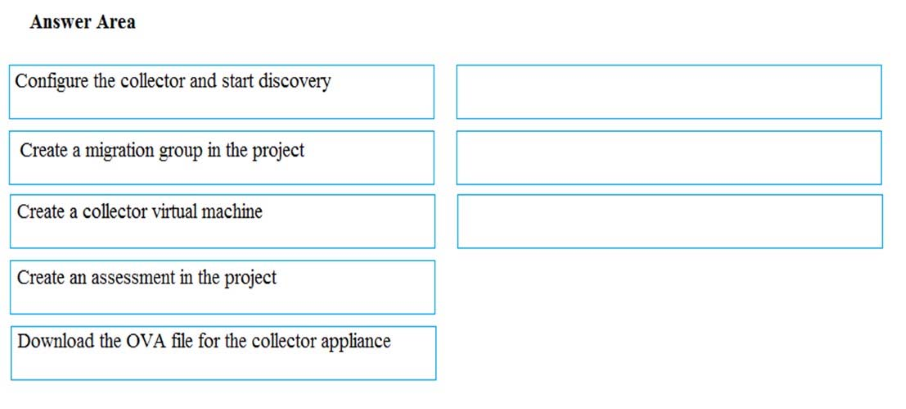
Which three actions should you perform in sequence? To answer, select the appropriate actions from the list of actions to the answer area and arrange them in the correct order.
Correct answer: To work with this question, an Exam Simulator is required.
Explanation:
Step 1: Download the OVA file for the collection applianceAzure Migrate uses an on-premises VM called the collector appliance, to discover information about your on-premises machines. To create the appliance, you download a setup file in Open Virtualization Appliance (.ova) format, and import it as a VM on your on-premises vCenter Server.Step 2: Create a migration group in the projectFor the purposes of assessment, you gather the discovered VMs into groups. For example, you might group VMs that run the same application. For more precise grouping, you can use dependency visualization to view dependencies of a specific machine, or for all machines in a group and refine the group.Step 3: Create an assessment in the projectAfter a group is defined, you create an assessment for it.References:https://docs.microsoft.com/en-us/azure/migrate/migrate-overview Step 1: Download the OVA file for the collection appliance
Azure Migrate uses an on-premises VM called the collector appliance, to discover information about your on-premises machines. To create the appliance, you download a setup file in Open Virtualization Appliance (.ova) format, and import it as a VM on your on-premises vCenter Server.
Step 2: Create a migration group in the project
For the purposes of assessment, you gather the discovered VMs into groups. For example, you might group VMs that run the same application. For more precise grouping, you can use dependency visualization to view dependencies of a specific machine, or for all machines in a group and refine the group.
Step 3: Create an assessment in the project
After a group is defined, you create an assessment for it.
References:
https://docs.microsoft.com/en-us/azure/migrate/migrate-overview
Question 5
You need to move the blueprint files to Azure.
What should you do?
- Generate a shared access signature (SAS). Map a drive, and then copy the files by using File Explorer.
- Use the Azure Import/Export service.
- Generate an access key. Map a drive, and then copy the files by using File Explorer.
- Use Azure Storage Explorer to copy the files.
Correct answer: D
Explanation:
Azure Storage Explorer is a free tool from Microsoft that allows you to work with Azure Storage data on Windows, macOS, and Linux. You can use it to upload and download data from Azure blob storage.Scenario:Planned Changes include: move the existing product blueprint files to Azure Blob storage.Technical Requirements include: Copy the blueprint files to Azure over the Internet.References:https://docs.microsoft.com/en-us/azure/machine-learning/team-data-science-process/move-data-to-azure-blob-using-azure-storage-explorer Azure Storage Explorer is a free tool from Microsoft that allows you to work with Azure Storage data on Windows, macOS, and Linux. You can use it to upload and download data from Azure blob storage.
Scenario:
Planned Changes include: move the existing product blueprint files to Azure Blob storage.
Technical Requirements include: Copy the blueprint files to Azure over the Internet.
References:
https://docs.microsoft.com/en-us/azure/machine-learning/team-data-science-process/move-data-to-azure-blob-using-azure-storage-explorer
Question 6
You have an Azure subscription named Subscription1.
You deploy a Linux virtual machine named VM1 to Subscription1.
You need to monitor the metrics and the logs of VM1.
What should you use?
- Linux Diagnostic Extension (LAD) 3.0
- Azure Analysis Services
- the AzurePerformanceDiagnostics extension
- Azure HDInsight
Correct answer: C
Explanation:
You can use extensions to configure diagnostics on your VMs to collect additional metric data.The basic host metrics are available, but to see more granular and VM-specific metrics, you need to install the Azure diagnostics extension on the VM. The Azure diagnostics extension allows additional monitoring and diagnostics data to be retrieved from the VM.References:https://docs.microsoft.com/en-us/azure/virtual-machines/linux/tutorial-monitoring You can use extensions to configure diagnostics on your VMs to collect additional metric data.
The basic host metrics are available, but to see more granular and VM-specific metrics, you need to install the Azure diagnostics extension on the VM. The Azure diagnostics extension allows additional monitoring and diagnostics data to be retrieved from the VM.
References:
https://docs.microsoft.com/en-us/azure/virtual-machines/linux/tutorial-monitoring
Question 7
You have an Azure subscription named Subscription1. Subscription1 contains the resources in the following table.
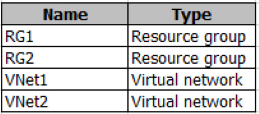
VNet1 is in RG1. VNet2 is in RG2. There is no connectivity between VNet1 and Vnet2.
An administrator named Admin1 creates an Azure virtual machine named VM1 in RG1. VM1 uses a disk named Disk1 and connects to VNet1. Admin1 then installs a custom application in VM1.
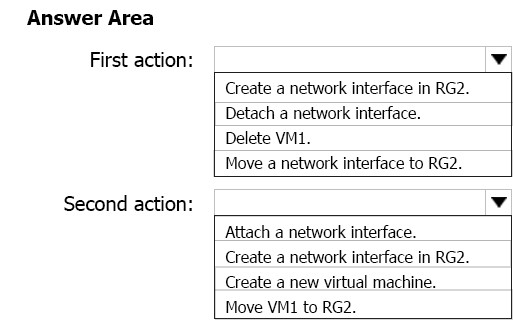
You need to move the custom application to Vnet2. The solution must minimize administrative effort.
Which two actions should you perform? To answer, select the appropriate options in the answer area.
NOTE: Each correct selection is worth one point.
Correct answer: To work with this question, an Exam Simulator is required.
Explanation:
You can move a VM and its associated resources to another resource group using the portal.References:https://docs.microsoft.com/en-us/azure/virtual-machines/windows/move-vm You can move a VM and its associated resources to another resource group using the portal.
References:
https://docs.microsoft.com/en-us/azure/virtual-machines/windows/move-vm
Question 8
You have an Azure subscription that contains two resource groups named RG1 and RG2. RG2 does not contain any resources. RG1 contains the resources in the following table.
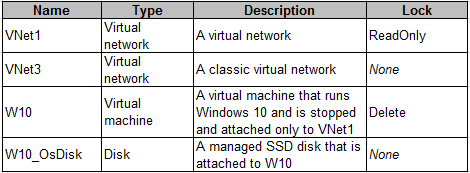
Which resource can you move to RG2?
- W10_OsDisk
- VNet1
- VNet3
- W10
Correct answer: B
Explanation:
When moving a virtual network, you must also move its dependent resources. For example, you must move gateways with the virtual network. VM W10, which is in Vnet1, is not a dependent resource.Incorrect Answers:A: Managed disks don't support move.C: Virtual networks (classic) can't be moved.D: Virtual machines with the managed disks cannot be moved.References:https://docs.microsoft.com/en-us/azure/azure-resource-manager/resource-group-move-resources#virtual-machines-limitations When moving a virtual network, you must also move its dependent resources. For example, you must move gateways with the virtual network. VM W10, which is in Vnet1, is not a dependent resource.
Incorrect Answers:
A: Managed disks don't support move.
C: Virtual networks (classic) can't be moved.
D: Virtual machines with the managed disks cannot be moved.
References:
https://docs.microsoft.com/en-us/azure/azure-resource-manager/resource-group-move-resources#virtual-machines-limitations
Question 9
You have an Azure subscription that contains 10 virtual machines.
You need to ensure that you receive an email message when any virtual machines are powered off, restarted, or deallocated.
What is the minimum number of rules and action groups that you require?
- three rules and three action groups
- one rule and one action group
- three rules and one action group
- one rule and three action groups
Correct answer: C
Explanation:
An action group is a collection of notification preferences defined by the user. Azure Monitor and Service Health alerts are configured to use a specific action group when the alert is triggered. Various alerts may use the same action group or different action groups depending on the user's requirements.References:https://docs.microsoft.com/en-us/azure/monitoring-and-diagnostics/monitoring-action-groups An action group is a collection of notification preferences defined by the user. Azure Monitor and Service Health alerts are configured to use a specific action group when the alert is triggered. Various alerts may use the same action group or different action groups depending on the user's requirements.
References:
https://docs.microsoft.com/en-us/azure/monitoring-and-diagnostics/monitoring-action-groups
Question 10
You have an Azure subscription named Subscription1.
In Subscription1, you create an Azure file share named share1.
You create a shared access signature (SAS) named SAS1 as shown in the following exhibit.
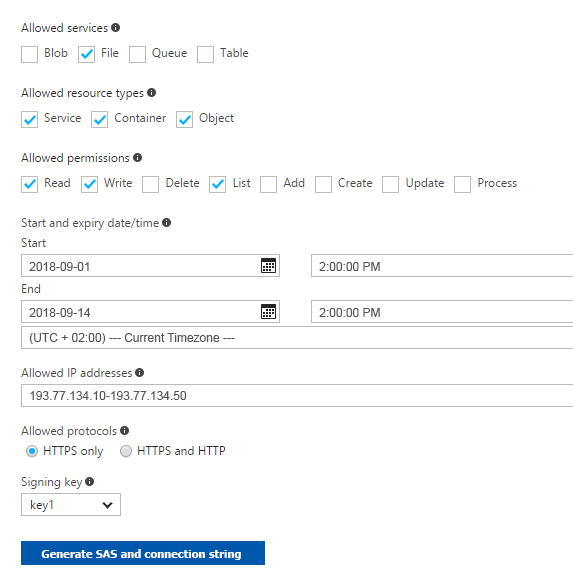
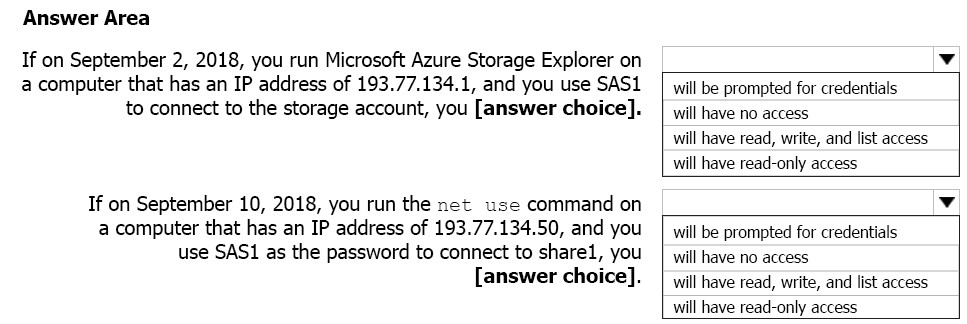
To answer, select the appropriate options in the answer area.
NOTE: Each correct selection is worth one point.
Correct answer: To work with this question, an Exam Simulator is required.
Explanation:
Box 1: Will have no access -The IP 193.77.134.1 does not have access on the SAS.Box 2: Will have read, write, and list accessThe net use command is used to connect to file shares.References:https://docs.microsoft.com/en-us/azure/storage/common/storage-dotnet-shared-access-signature-part-1 https://docs.microsoft.com/en-us/azure/vs-azure-tools-storage-manage-with-storage-explorer?tabs=windows Box 1: Will have no access -
The IP 193.77.134.1 does not have access on the SAS.
Box 2: Will have read, write, and list access
The net use command is used to connect to file shares.
References:
https://docs.microsoft.com/en-us/azure/storage/common/storage-dotnet-shared-access-signature-part-1 https://docs.microsoft.com/en-us/azure/vs-azure-tools-storage-manage-with-storage-explorer?tabs=windows
Question 11
You need to resolve the licensing issue before you attempt to assign the license again.
What should you do?
- From the Groups blade, invite the user accounts to a new group.
- From the Profile blade, modify the usage location.
- From the Directory role blade, modify the directory role.
Correct answer: B
Explanation:
License cannot be assigned to a user without a usage location specified.Scenario: Licensing Issue -You attempt to assign a license in Azure to several users and receive the following error message: "Licenses not assigned. License agreement failed for one user."You verify that the Azure subscription has the available licenses. License cannot be assigned to a user without a usage location specified.
Scenario: Licensing Issue -
You attempt to assign a license in Azure to several users and receive the following error message: "Licenses not assigned. License agreement failed for one user."
You verify that the Azure subscription has the available licenses.
HOW TO OPEN VCE FILES
Use VCE Exam Simulator to open VCE files

HOW TO OPEN VCEX FILES
Use ProfExam Simulator to open VCEX files


ProfExam at a 20% markdown
You have the opportunity to purchase ProfExam at a 20% reduced price
Get Now!