Download Configuring Windows Server Hybrid Advanced Services.AZ-801.ExamTopics.2025-11-22.168q.tqb
| Vendor: | Microsoft |
| Exam Code: | AZ-801 |
| Exam Name: | Configuring Windows Server Hybrid Advanced Services |
| Date: | Nov 22, 2025 |
| File Size: | 13 MB |
How to open TQB files?
Files with TQB (Taurus Question Bank) extension can be opened by Taurus Exam Studio.
Purchase
Coupon: TAURUSSIM_20OFF
Discount: 20%





Demo Questions
Question 1
Note: This question is part of a series of questions that present the same scenario. Each question in the series contains a unique solution that might meet the stated goals. Some question sets might have more than one correct solution, while others might not have a correct solution.
After you answer a question in this section, you will NOT be able to return to it. As a result, these questions will not appear in the review screen.
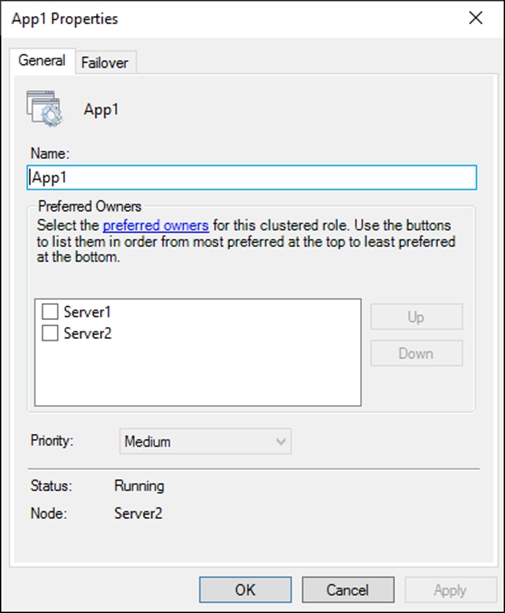
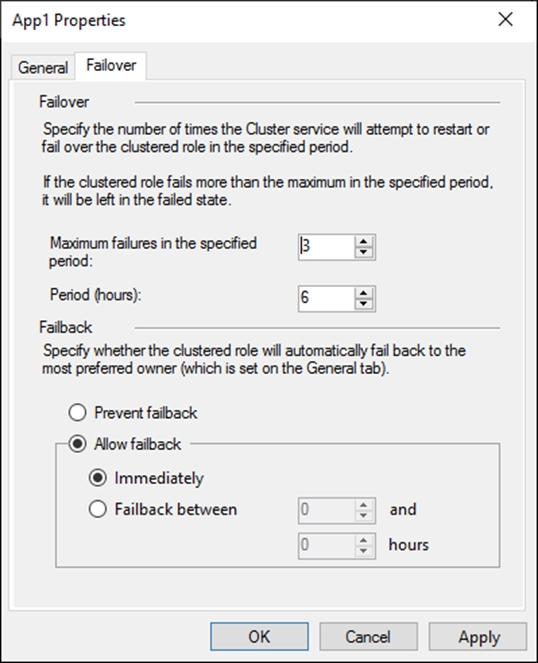
You have a failover cluster named Cluster1 that hosts an application named App1.
The General tab in App1 Properties is shown in the General exhibit. (Click the General tab.)
The Failover tab in App1 Properties is shown in the Failover exhibit. (Click the Failover tab.)
Server1 shuts down unexpectedly.
You need to ensure that when you start Server1, App1 continues to run on Server2.
Solution: You pause the Server1 node in Cluster1 and then start Server1.
Does this meet the goal?
- Yes
- No
Correct answer: B
Explanation:
A: 7B: 10 - Mosted A: 7B: 10 - Mosted
Question 2
Your network contains an Active Directory Domain Services (AD DS) domain. The domain contains a server named Server1 that runs Windows Server.
You run Get-BitLockerVolume -MountPoint C,D | fl *, which generates the following output.
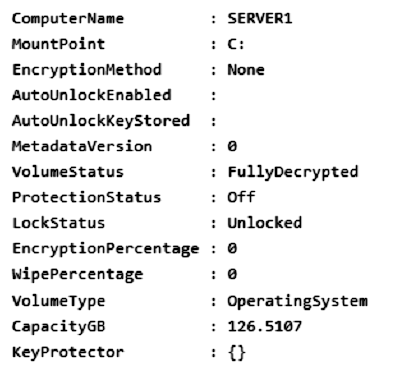
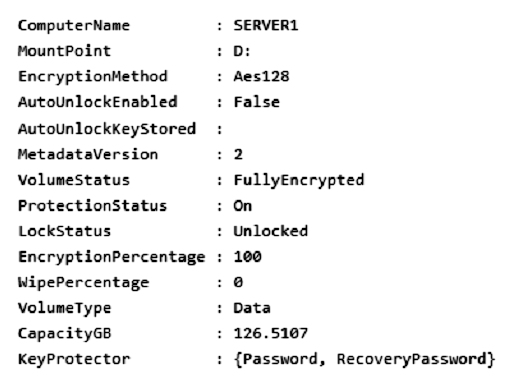
You need to ensure that volume D will be unlocked automatically when Server1 restarts.
How should you complete the command? To answer, select the appropriate options in the answer area.
NOTE: Each correct selection is worth one point.
Correct answer: To work with this question, an Exam Simulator is required.
Explanation:
Box 1: Add-BitLockerKeyProtectorFrom the exhibit we see for volume D that AutoUnlockEnabled is False, and AutoUnlockKeyStored is empty.The Add-BitLockerKeyProtector cmdlet adds a protector for the volume key of the volume protected with BitLocker Drive Encryption.Example: The following example adds an ADAccountOrGroup protector to the previously encrypted operating system volume using the SID of the account:Add-BitLockerKeyProtector C: -ADAccountOrGroupProtector -ADAccountOrGroup S-1-5-21-3651336348-8937238915-291003330-500Active Directory-based protectors are normally used to unlock Failover Cluster enabled volumes.Box 2: Service -The -Service parameter indicates that the system account for this computer unlocks the encrypted volume.Add-BitLockerKeyProtector syntax with use of the ADAccountOrGroupProtector parameter:Add-BitLockerKeyProtector -[-MountPoint] <String[]>[-ADAccountOrGroupProtector][-ADAccountOrGroup] <String>[-Service][-WhatIf][-Confirm][<CommonParameters>]Incorrect:* Enable-BitLockerAutoUnlockThe Enable-BitLockerAutoUnlock cmdlet enables automatic unlocking for a volume protected by BitLocker Disk Encryption.The command has no -ADAccountOrGroupProtector parameter.Syntax:Enable-BitLockerAutoUnlock -[-MountPoint] <String[]>[-WhatIf][-Confirm][<CommonParameters>]* The Clear-BitLockerAutoUnlock cmdlet removes all automatic unlocking keys used by BitLocker Drive Encryption. BitLocker stores these keys for the fixed data drives of a system on a volume that hosts a BitLocker-enabled operating system volume so that it can automatically unlock the fixed and removable data volumes in a system. This makes it easier for users to access data volumes.Syntax: Clear-BitLockerAutoUnlock []Reference:https://docs.microsoft.com/en-us/windows/security/information-protection/bitlocker/bitlocker-use-bitlocker-drive-encryption-tools-to-manage-bitlocker https://docs.microsoft.com/en-us/powershell/module/bitlocker/add-bitlockerkeyprotector Box 1: Add-BitLockerKeyProtector
From the exhibit we see for volume D that AutoUnlockEnabled is False, and AutoUnlockKeyStored is empty.
The Add-BitLockerKeyProtector cmdlet adds a protector for the volume key of the volume protected with BitLocker Drive Encryption.
Example: The following example adds an ADAccountOrGroup protector to the previously encrypted operating system volume using the SID of the account:
Add-BitLockerKeyProtector C: -ADAccountOrGroupProtector -ADAccountOrGroup S-1-5-21-3651336348-8937238915-291003330-500
Active Directory-based protectors are normally used to unlock Failover Cluster enabled volumes.
Box 2: Service -
The -Service parameter indicates that the system account for this computer unlocks the encrypted volume.
Add-BitLockerKeyProtector syntax with use of the ADAccountOrGroupProtector parameter:
Add-BitLockerKeyProtector -
[-MountPoint] <String[]>
[-ADAccountOrGroupProtector]
[-ADAccountOrGroup] <String>
[-Service]
[-WhatIf]
[-Confirm]
[<CommonParameters>]
Incorrect:
* Enable-BitLockerAutoUnlock
The Enable-BitLockerAutoUnlock cmdlet enables automatic unlocking for a volume protected by BitLocker Disk Encryption.
The command has no -ADAccountOrGroupProtector parameter.
Syntax:
Enable-BitLockerAutoUnlock -
[-MountPoint] <String[]>
[-WhatIf]
[-Confirm]
[<CommonParameters>]
* The Clear-BitLockerAutoUnlock cmdlet removes all automatic unlocking keys used by BitLocker Drive Encryption. BitLocker stores these keys for the fixed data drives of a system on a volume that hosts a BitLocker-enabled operating system volume so that it can automatically unlock the fixed and removable data volumes in a system. This makes it easier for users to access data volumes.
Syntax: Clear-BitLockerAutoUnlock []
Reference:
https://docs.microsoft.com/en-us/windows/security/information-protection/bitlocker/bitlocker-use-bitlocker-drive-encryption-tools-to-manage-bitlocker
https://docs.microsoft.com/en-us/powershell/module/bitlocker/add-bitlockerkeyprotector
Question 3
Your network contains an Active Directory Domain Services (AD DS) domain. The domain contains 20 Active Directory sites. All user management is performed from a central site.
You add users to a group.
You discover that group changes do NOT appear on a domain controller in a remote site.
You need to identify whether the group changes appear on other domain controllers.
What should you use?
- Active Directory Sites and Services
- Active Directory Replication Status Tool
- Microsoft Support and Recovery Assistant
- File Replication Service (FRS) Status Viewer
Correct answer: B
Explanation:
B: 4 - Mosted B: 4 - Mosted
Question 4
You need to meet technical requirements for Share1.
What should you use?
- Storage Migration Service
- File Server Resource Manager (FSRM)
- Server Manager
- Storage Replica
Correct answer: A
Explanation:
A: 7 - Mosted A: 7 - Mosted
Question 5
Note: This question is part of a series of questions that present the same scenario. Each question in the series contains a unique solution that might meet the stated goals. Some question sets might have more than one correct solution, while others might not have a correct solution.
After you answer a question in this section, you will NOT be able to return to it. As a result, these questions will not appear in the review screen.
Your network contains a single-domain Active Directory Domain Services (AD DS) forest named contoso.com. The functional level of the forest is Windows Server
2012 R2. All domain controllers run Windows Server 2012 R2.
Sysvol replicates by using the File Replication Service (FRS).
You plan to replace the existing domain controllers with new domain controllers that will run Windows Server 2022.
You need to ensure that you can add the first domain controller that runs Windows Server 2022.
Solution: You raise the domain and forest functional levels.
Does this meet the goal?
- Yes
- No
Correct answer: B
Explanation:
A: 3B: 5 - Mosted A: 3B: 5 - Mosted
Question 6
You are planning the DHCP1 migration to support the DHCP migration plan.
Which two PowerShell cmdlets should you run on DHCP1, and which two PowerShell cmdlets should you run on DHCP2? To answer, drag the appropriate cmdlets to the correct servers. Each cmdlet may be used once, more than once, or not at all. You may need to drag the split bar between panes or scroll to view content.
NOTE: Each correct selection is worth one point.
Correct answer: To work with this question, an Exam Simulator is required.
Explanation:
Reference:https://theitbros.com/how-to-migrate-dhcp-to-windows-server-2016/ Reference:
https://theitbros.com/how-to-migrate-dhcp-to-windows-server-2016/
Question 7
You are planning the data share migration to support the on-premises migration plan.
What should you use to perform the migration?
- Storage Migration Service
- Microsoft File Server Migration Toolkit
- File Server Resource Manager (FSRM)
- Windows Server Migration Tools
Correct answer: A
Explanation:
A: 7 - MostedD: 1 A: 7 - MostedD: 1
Question 8
You have an Azure subscription that contains an Azure key vault named Vault1.
You plan to deploy a virtual machine named VM1 that will run Windows Server.
You need to enable encryption at host for VM1. The solution must use customer-managed keys.
Which three actions should you perform in sequence? To answer, move the appropriate actions from the list of actions to the answer area and arrange them in the correct order.
Correct answer: To work with this question, an Exam Simulator is required.
Question 9
Note: This question is part of a series of questions that present the same scenario. Each question in the series contains a unique solution that might meet the stated goals. Some question sets might have more than one correct solution, while others might not have a correct solution.
After you answer a question in this section, you will NOT be able to return to it. As a result, these questions will not appear in the review screen.
You deploy Azure Migrate to an on-premises network.
You have an on-premises physical server named Server1 that runs Windows Server and has the following configurations:
- Operating system disk: 600 GB
- Data disk: 3 TB
- NIC Teaming: Enabled
- Mobility service: Installed
- Windows Defender Firewall: Enabled
- Microsoft Defender Antivirus: Enabled
You need to ensure that you can use Azure Migrate to migrate Server1.
Solution: You disable Windows Defender Firewall on Server1.
Does this meet the goal?
- Yes
- No
Correct answer: B
Explanation:
B: 4 - Mosted B: 4 - Mosted
Question 10
Note: This question is part of a series of questions that present the same scenario. Each question in the series contains a unique solution that might meet the stated goals. Some question sets might have more than one correct solution, while others might not have a correct solution.
After you answer a question in this section, you will NOT be able to return to it. As a result, these questions will not appear in the review screen.
You deploy Azure Migrate to an on-premises network.
You have an on-premises physical server named Server1 that runs Windows Server and has the following configurations:
- Operating system disk: 600 GB
- Data disk: 3 TB
- NIC Teaming: Enabled
- Mobility service: Installed
- Windows Defender Firewall: Enabled
- Microsoft Defender Antivirus: Enabled
You need to ensure that you can use Azure Migrate to migrate Server1.
Solution: You shrink the data disk on Server1.
Does this meet the goal?
- Yes
- No
Correct answer: B
Explanation:
B: 1 - Mosted B: 1 - Mosted
HOW TO OPEN VCE FILES
Use VCE Exam Simulator to open VCE files

HOW TO OPEN VCEX FILES
Use ProfExam Simulator to open VCEX files


ProfExam at a 20% markdown
You have the opportunity to purchase ProfExam at a 20% reduced price
Get Now!