Download Administering Windows Server.AZ-802.PassLeader.2026-10-29.88q.vcex
| Vendor: | Microsoft |
| Exam Code: | AZ-802 |
| Exam Name: | Administering Windows Server |
| Date: | Oct 29, 2026 |
| File Size: | 5 MB |
How to open VCEX files?
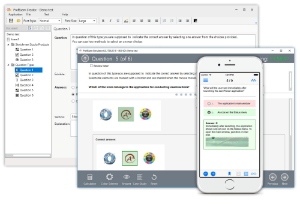
Files with VCEX extension can be opened by ProfExam Simulator.
Purchase
Coupon: TAURUSSIM_20OFF
Discount: 20%
Demo Questions
Question 1
Your network contains an Active Directory Domain Services (AD DS) forest.
The forest contains a parent domain named contoso.com and a child domain named corp.contoso.com. Both domains contain domain controllers that have the DNS Server role installed. Some domain controllers in contoso.com do NOT have the DNS Server role installed.
The DNS zone for contoso.com is Active Directory-integrated and uses secure dynamic updates.
The zone replicates to all the DNS servers in the forest.
You need to modify the zone to meet the following requirements:
- Prevent the DNS servers in corp.contoso.com from receiving contoso.com zone data.
- Minimize Active Directory replication traffic.
What should you do?
- Change the zone replication scope to all the domain controllers in the contoso.com domain.
- Change the zone replication scope to all the DNS servers on the domain controllers in the forest.
- Change the zone replication scope to all the DNS servers on the domain controllers in the contoso.com domain.
- Change the zone as a secondary zone on each domain controller.
Correct answer: C
Explanation:
Change the DNS zone replication scope for contoso.com from forest-wide (ForestDnsZones) to domain-wide (DomainDnsZones). First Requirement (Prevent child domain from receiving data): Changing the scope to All DNS servers in the domain (DomainDnsZones) restricts the zone data to only the domain controllers running DNS within the contoso.com domain, excluding domain controllers and DNS servers in the child domain corp.contoso.com. Second Requirement (Minimize replication traffic): It stops unnecessary replication across the entire forest to the child domain, containing updates strictly to the parent domain partition. Steps: 1. Open DNS Manager (dnsmgmt.msc) on a domain controller in contoso.com. 2. Expand the contoso.com forward lookup zone properties. 3. On the General tab, click Change next to the Replication setting. 4. Select To all DNS servers running on domain controllers in this domain (DomainDnsZones) and click OK. Reference: https://learn.microsoft.com/en-us/troubleshoot/windows-server/networking/create-apply-custom-application-directory-partition Change the DNS zone replication scope for contoso.com from forest-wide (ForestDnsZones) to domain-wide (DomainDnsZones).
First Requirement (Prevent child domain from receiving data):
Changing the scope to All DNS servers in the domain (DomainDnsZones) restricts the zone data to only the domain controllers running DNS within the contoso.com domain, excluding domain controllers and DNS servers in the child domain corp.contoso.com.
Second Requirement (Minimize replication traffic):
It stops unnecessary replication across the entire forest to the child domain, containing updates strictly to the parent domain partition.
Steps:
1. Open DNS Manager (dnsmgmt.msc) on a domain controller in contoso.com.
2. Expand the contoso.com forward lookup zone properties.
3. On the General tab, click Change next to the Replication setting.
4. Select To all DNS servers running on domain controllers in this domain (DomainDnsZones) and click OK.
Reference:
https://learn.microsoft.com/en-us/troubleshoot/windows-server/networking/create-apply-custom-application-directory-partition
Question 2
You have a server named DHCP1 that runs Windows Server and has the DHCP Server role installed.
DHCP1 hosts an activated IPv4 scope for a subnet of 192.168.15.0/24.
You have a CSV file named PrinterReservations.csv that contains the following columns:
- ClientId
- ScopeId
- IPAddress
- MacAddress
All the IP addresses in PrinterReservations.csv are within the scope range and are currently available.
You need to create DHCP reservations for 20 printers by using PrinterReservations.csv. The solution must minimize administrative effort.
Which PowerShell command should you run?
- Import-Csv .\PrinterReservations.csv | Set-DhcpServerv4Reservation -ComputerName DHCP1
- Import-Csv .\PrinterReservations.csv | Add-DhcpServerv4Reservation -ComputerName DHCP1
- Import-Csv .\PrinterReservations.csv | Add-DhcpServerv4FxclusionRange -ComputerName DHCP1
- Import-Csv \PrinterReservations.csv | ForEach-Object { Add-DhcpServerv4Filter -ComputerName DHCP1 -List Allow -MacAddress $_.ClientId }
Correct answer: B
Explanation:
Use the Import-Csv command piped into Add-DhcpServerv4Reservation.This combined approach allows you to import the data and create all twenty-five reservations simultaneously with a single line of code. Run the following command in an elevated PowerShell window: Import-Csv -Path "C:\path\to\your\file.csv" | Add-DhcpServerv4Reservation Reference: https://learn.microsoft.com/en-us/windows-server/networking/technologies/dhcp/quickstart-install-configure-dhcp-server Use the Import-Csv command piped into Add-DhcpServerv4Reservation.This combined approach allows you to import the data and create all twenty-five reservations simultaneously with a single line of code.
Run the following command in an elevated PowerShell window:
Import-Csv -Path "C:\path\to\your\file.csv" | Add-DhcpServerv4Reservation
Reference:
https://learn.microsoft.com/en-us/windows-server/networking/technologies/dhcp/quickstart-install-configure-dhcp-server
Question 3
Your network contains an on-premises Active Directory Domain Services (AD DS) forest named contoso.com.
The forest contains three domain controllers that have the DNS Server role installed and host an Active Directory-integrated zone for contoso.com. The DNS servers use existing forwarders for internet name resolution.
You have a partner company that owns a DNS namespace named fabrikam.com and provides DNS servers at IP addresses 172.16.10.10 and 172.16.10.11 over a Site-to-Site (S2S) VPN.
You need to configure the DNS servers in the contoso.com forest. The solution must meet the following requirements:
- Send queries for fabrikam.com to the partner company’s DNS servers.
- Continue to use the existing forwarders for other external namespaces.
- Apply the configuration to all the current and future DNS servers on the domain controllers in contoso.com.
What should you do?
- Configure forwarders that use 172.16.10.10 and 172.16.10.11.
- Create an Active Directory-integrated conditional forwarder for fabrikam.com that uses 172.16.10.10 and 172.16.10.11.
- Create a locally stored conditional forwarder for fabrikam.com that uses 172.16.10.10 and 172.16.10.11.
- Configure root hints that use 172.16.10.10 and 172.16.10.11.
Correct answer: A
Explanation:
Create an Active Directory-integrated conditional forwarder for fabrikam.com with a forest-wide replication scope. DNS Domain Name: fabrikam.com' Master Servers: 172.16.10.10 and 172.16.10.11 Replication Scope: Stored in Active Directory and replicated to All DNS servers in the forest (Forest-wide). Reference: https://www.sentinelidentity.ca/posts/windows-dns-forwarders-conditional-stub Create an Active Directory-integrated conditional forwarder for fabrikam.com with a forest-wide replication scope.
DNS Domain Name: fabrikam.com'
Master Servers: 172.16.10.10 and 172.16.10.11
Replication Scope: Stored in Active Directory and replicated to All DNS servers in the forest (Forest-wide).
Reference:
https://www.sentinelidentity.ca/posts/windows-dns-forwarders-conditional-stub
Question 4
Your network contains an Active Directory Domain Services (AD DS) domain. The domain contains a server named DHCP1 that runs Windows Server and has the DHCP Server role installed. DHCP1 has a static IPv4 address of 10.10.10.5/24.
DHCP1 is authorized in AD DS and contains an active scope for a subnet of 10.10.20.0/24.
Client computers on the 10.10.20.0/24 subnet receive APIPA addresses. You verify that the DHCP Server service is running, and the scope has available IP addresses.
You need to ensure that the computers on 10.10.20.0/24 can obtain IPv4 address leases from DHCP1.
What should you do?
- Run Add-DhcpServerInDC.
- Create an exclusion.
- Configure a DHCP relay.
- Run Add-DhcpServerSecurityGroup.
Correct answer: C
Explanation:
Configure a DHCP Relay Agent (such as an IP Helper address on the router) to forward DHCP traffic from the 10.10.20.0/24 subnet to the DHCP server at 10.10.10.5. Subnet Mismatch: The DHCP server is located on the 10.10.10.0/24 subnet. Broadcast Isolation: Client computers are on the 10.10.20.0/24 subnet. DHCP discovery requests use network broadcasts, which routers drop by default. APIPA Result: Because the broadcast messages never cross the router to reach the DHCP server, the clients fail to get an IP and fall back to APIPA (169.254.x.x) addresses. Reference: https://learn.microsoft.com/en-us/windows-server/networking/technologies/dhcp/quickstart-install-configure-dhcp-server Configure a DHCP Relay Agent (such as an IP Helper address on the router) to forward DHCP traffic from the 10.10.20.0/24 subnet to the DHCP server at 10.10.10.5.
Subnet Mismatch: The DHCP server is located on the 10.10.10.0/24 subnet.
Broadcast Isolation: Client computers are on the 10.10.20.0/24 subnet. DHCP discovery requests use network broadcasts, which routers drop by default.
APIPA Result: Because the broadcast messages never cross the router to reach the DHCP server, the clients fail to get an IP and fall back to APIPA (169.254.x.x) addresses.
Reference:
https://learn.microsoft.com/en-us/windows-server/networking/technologies/dhcp/quickstart-install-configure-dhcp-server
Question 5
Your network contains an Active Directory Domain Services (AD DS) domain.
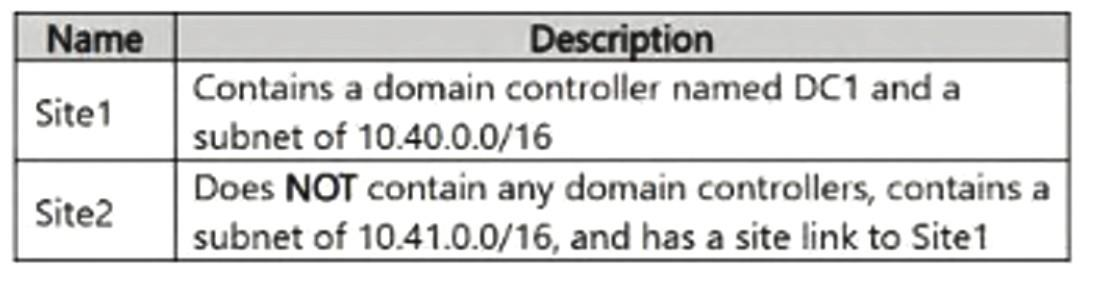
The domain contains the sites shown in the following table.
You plan to move a domain controller named DC2 to Site2.
You need to ensure that the client computers in Site2 locate DC2 by using AD DS site awareness.
The solution must NOT affect other client computers on 10.40.0.0/16.
What should you do?
- Assign the 10.41.0.0/16 subnet to Site2.
- Assign the 10.40.0.0/16 subnet to Site2.
- Create a replication connection object for DC2 in Site2 and assign the 10.40.0.0/16 subnet to Site2.
- Create a replication connection object for DC1 in Site1 and assign the 10.41.0.0/16 subnet to Site1.
Correct answer: A
Explanation:
A replication connection object does not need to be created manually, but you must assign subnet 10.41.0.0/16 to Site2. Automatic Generation: The Knowledge Consistency Checker (KCC) automatically creates replication connection objects. Site Link: Since a site link already exists between Site1 and Site2, the KCC will automatically build the replication topology once DC2 is moved. Subnet and Site Configuration Subnet 10.41.0.0/16: Assign this explicitly to Site2. This ensures clients on that subnet use site awareness to locate DC2 locally. A replication connection object does not need to be created manually, but you must assign subnet 10.41.0.0/16 to Site2.
Automatic Generation: The Knowledge Consistency Checker (KCC) automatically creates replication connection objects.
Site Link: Since a site link already exists between Site1 and Site2, the KCC will automatically build the replication topology once DC2 is moved.
Subnet and Site Configuration
Subnet 10.41.0.0/16: Assign this explicitly to Site2. This ensures clients on that subnet use site awareness to locate DC2 locally.
Question 6
You have a Windows Server failover cluster (WSFC) named Cluster1 that has two nodes and uses Storage Spaces Direct. The nodes contain a non-primordial storage pool named Pool1. Pool1 is read-only and contains no virtual disks.
You delete Cluster1 and redeploy the cluster by using the same nodes.
During the redeployment, Windows Admin Center reports a storage error.
You need to remove the stale storage configuration so that the disks can be reused for the redeployment.
Which two actions should you perform? Each correct answer presents part of the solution.
NOTE: Each correct selection is worth one point.
- Make Pool1 writable.
- Remove Pool1.
- Create a new storage pool by using the disks from Pool1.
- Clear the cluster configuration from each node.
- Reset the physical disks in Pool1.
Correct answer: A, B
Explanation:
To remove the stale storage configuration and clear the read-only, non-primordial storage pool left from the deleted cluster, you must change the pool's read-only state and then delete the pool using PowerShell. Required Steps Step 1: Set the storage pool to read-write.Run the following PowerShell command on the nodes to clear the read-only attribute: Get-StoragePool -IsPrimordial $False | Set-StoragePool -IsReadOnly $false Step 2: Delete the stale storage pool.Run the following PowerShell command to remove the storage pool and release the metadata on the physical disks: Get-StoragePool -IsPrimordial $False | Remove-StoragePool Reference: https://learn.microsoft.com/en-us/windows-server/storage/storage-spaces/storage-spaces-states To remove the stale storage configuration and clear the read-only, non-primordial storage pool left from the deleted cluster, you must change the pool's read-only state and then delete the pool using PowerShell.
Required Steps
Step 1: Set the storage pool to read-write.Run the following PowerShell command on the nodes to clear the read-only attribute:
Get-StoragePool -IsPrimordial $False | Set-StoragePool -IsReadOnly $false
Step 2: Delete the stale storage pool.Run the following PowerShell command to remove the storage pool and release the metadata on the physical disks:
Get-StoragePool -IsPrimordial $False | Remove-StoragePool
Reference:
https://learn.microsoft.com/en-us/windows-server/storage/storage-spaces/storage-spaces-states
Question 7
Your network contains an Active Directory Domain Services (AD DS) domain. The domain contains the following servers:
- Server1: Has the DES Namespaces role service installed
- Server2: Has the DFS Namespaces role service installed
- Server3: Hosts a file share named
- Server4: Hosts a file share named
You need to publish both files shares in a single DFS namespace named Corp. Corp must remain available if either Server1 or Server2 is unavailable.
What should you do?
- Configure a DFS Replication group that includes Server1 and Server2.
- Configure a domain-based namespace and add Server1 and Server2 as namespace servers.
- Configure a DFS Replication group that includes Server3 and Server4.
- Configure a domain-based namespace and add Server1 as the only namespace server.
Correct answer: B
Explanation:
Create a domain-based DFS namespace on Server1, add Server2 as a namespace server for high availability, and then create folder targets under the namespace pointing to Server3 and Server4. Reference: https://learn.microsoft.com/en-us/windows-server/storage/dfs-namespaces/dfs-overview Create a domain-based DFS namespace on Server1, add Server2 as a namespace server for high availability, and then create folder targets under the namespace pointing to Server3 and Server4.
Reference:
https://learn.microsoft.com/en-us/windows-server/storage/dfs-namespaces/dfs-overview
Question 8
You have a file server named Server1 that runs Windows Server and hosts file shares.
You need to enable SMB access to the shares from the internet without deploying a VPN. The solution must ensure that inbound TCP 445 is blocked from the internet.
What should you configure?
- SMB over QUIC
- SMB Multichannel
- SMB Encryption
- SMB Direct
Correct answer: A
Explanation:
SMB over QUIC is the feature to configure, which encapsulates SMB traffic inside a TLS 1.3-encrypted tunnel running over UDP port 443 instead of traditional TCP port 445. Reference: https://learn.microsoft.com/en-us/windows-server/storage/file-server/smb-over-quic SMB over QUIC is the feature to configure, which encapsulates SMB traffic inside a TLS 1.3-encrypted tunnel running over UDP port 443 instead of traditional TCP port 445.
Reference:
https://learn.microsoft.com/en-us/windows-server/storage/file-server/smb-over-quic
Question 9
Your network contains an on-premises Active Directory Domain Services (AD DS) domain. The domain contains servers that run Windows Server. The domain contains a group named Group1.
You have an Azure Storage account that contains an Azure Files share named share1. Identity-based authentication for Azure Files is enabled by using the domain. Group1 syncs with a Microsoft Entra tenant.
The members of Group1 can authenticate from the servers but cannot access the files in share1.
Group1 has Modify NTFS permissions for the required folders in share1.
You need to grant Group1 share-level access to meet the following requirements:
- Allow the members to read, write, and delete files over SMB.
- Prevent the members from modifying the NTFS permissions.
- Follow the principle of least privilege.
Which role should you assign to Group1 at the scope of share1?
- Storage File Data SMB Share Contributor
- Storage File Data SMB Share Elevated Contributor
- Storage File Data Privileged Contributor
- Storage File Data SMB Share Reader
Correct answer: A
Explanation:
Storage File Data SMB Share Contributor should be assigned to the group. Storage File Data SMB Share Contributor allows read, write, and delete access over SMB while preventing the modification of Windows/NTFS ACL permissions (which requires the Elevated Contributor role). This follows the principle of least privilege by granting only the necessary data actions without administrative ACL modification rights at the share level. Reference: https://learn.microsoft.com/en-us/azure/storage/files/storage-files-identity-assign-share-level-permissions Storage File Data SMB Share Contributor should be assigned to the group.
Storage File Data SMB Share Contributor allows read, write, and delete access over SMB while preventing the modification of Windows/NTFS ACL permissions (which requires the Elevated Contributor role).
This follows the principle of least privilege by granting only the necessary data actions without administrative ACL modification rights at the share level.
Reference:
https://learn.microsoft.com/en-us/azure/storage/files/storage-files-identity-assign-share-level-permissions
Question 10
You have an Azure subscription. The subscription contains 40 virtual machines that run Windows Server and are in a resource group named RG1.
The virtual machines restart every Sunday from 2:00 AM to 4:00 AM during maintenance. The restarts trigger metric alert rules that send email and SMS notifications.
You need to prevent notifications during the maintenance window without changing the alert rule conditions. The solution must apply to all the alerts from RG1 and allow notifications outside the maintenance window.
What should you configure?
- a new metric alert rule
- an alert processing rule
- a dynamic threshold on the metric alert rules
- a service health alert rule
Correct answer: B
Explanation:
To resolve this issue, you need to configure an Alert Processing Rule in Azure Monitor. Alert processing rules allow you to selectively suppress notifications at scale over specific scopes without altering the conditions of your existing individual alert rules. Reference: https://learn.microsoft.com/en-us/azure/azure-monitor/alerts/alerts-processing-rules To resolve this issue, you need to configure an Alert Processing Rule in Azure Monitor.
Alert processing rules allow you to selectively suppress notifications at scale over specific scopes without altering the conditions of your existing individual alert rules.
Reference:
https://learn.microsoft.com/en-us/azure/azure-monitor/alerts/alerts-processing-rules
HOW TO OPEN VCE FILES
Use VCE Exam Simulator to open VCE files
HOW TO OPEN VCEX FILES
Use ProfExam Simulator to open VCEX files
ProfExam at a 20% markdown
You have the opportunity to purchase ProfExam at a 20% reduced price
Get Now!