Download Cloud and AI Security Engineer Associate.SC-500.DumpsBase.2026-08-02.20q.vcex
| Vendor: | Microsoft |
| Exam Code: | SC-500 |
| Exam Name: | Cloud and AI Security Engineer Associate |
| Date: | Aug 02, 2026 |
| File Size: | 1 MB |
How to open VCEX files?
Files with VCEX extension can be opened by ProfExam Simulator.
Purchase
Coupon: TAURUSSIM_20OFF
Discount: 20%
Demo Questions
Question 1
You have an Azure subscription named Sub1 that contains a storage account named storage1. Sub1 has Microsoft Defender for Storage enabled. Defender for Storage has malware scanning enabled.
You need to configure a solution that automates the remediation of malware detected in storage1.
What should you include in the solution?
- Application Insights
- Azure Event Hubs
- Azure Event Grid
- Azure Policy
Correct answer: C
Question 2
Testlet 1
Overview
Contoso, Ltd. is a consulting company that has a main office in San Francisco and a branch office in Dallas.
Contoso has a hybrid environment that contains on-premises servers connected to Azure, a Microsoft 365 E5 subscription, and an Azure subscription named Sub1.
Existing Environment. Microsoft Entra tenant
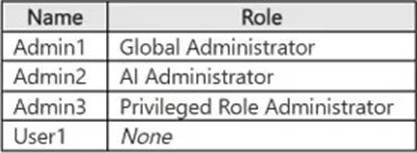
Contoso has a Microsoft Entra tenant named contoso.com that contains the users shown in the following table.
Existing Environment. On-premises environment
The on-premises network contains an Active Directory Domain Services (AD DS) forest that syncs with contoso.com. The forest contains a server named Server1 that runs Windows Server.
Existing Environment. Azure subscription
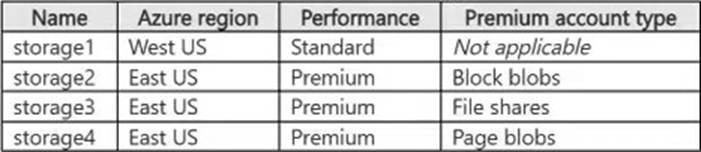
Sub1 contains the storage accounts shown in the following table.
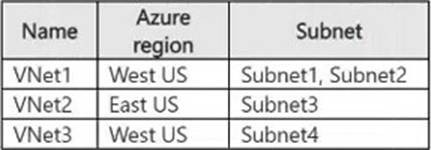
Sub1 contains the virtual networks shown in the following table.
Sub1 contains the virtual machines shown in the following table.
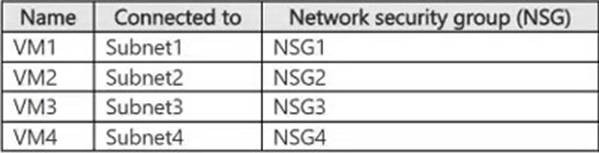
The network interface of VM1 is associated with an application security group named ASG1.
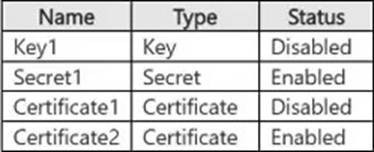
Sub1 contains the resources shown in the following table.

Vault1 stores the objects shown in the following table.
Existing Environment. Privileged Identity Management (PIM) configuration
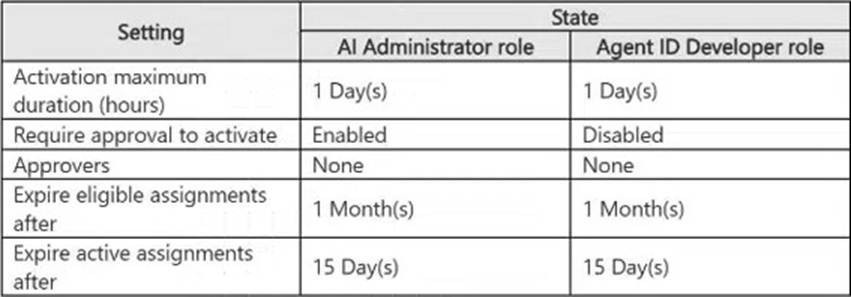
You manage privileged roles by using Privileged Identity Management (PIM).
The PIM role settings are configured as shown in the following table.
Existing Environment. Microsoft Sentinel configuration
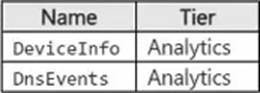
Contoso has a Microsoft Sentinel workspace that contains the following tables.
Requirements. Planned changes
Contoso plans to implement the following changes:
- Integrate AKS1 with Vault1.
- Enable Microsoft Entra Kerberos authentication for all supported storage.
- Configure auditing for sql1 by using the Azure portal and store audit logs in a centralized location.
Requirements. Technical requirements
Contoso identifies the following technical requirements:
- Protect Server1 by using file integrity monitoring.
- Protect AKS1 by using Microsoft Defender for Cloud.
- Configure Microsoft Sentinel to retain data for the maximum supported duration without changing the tier.
- Store objects used for authentication and encryption in Vault1 and ensure that Vault1 regenerates the objects every 30 days, whenever possible.
User1 has requested to use the AI Administrator role.
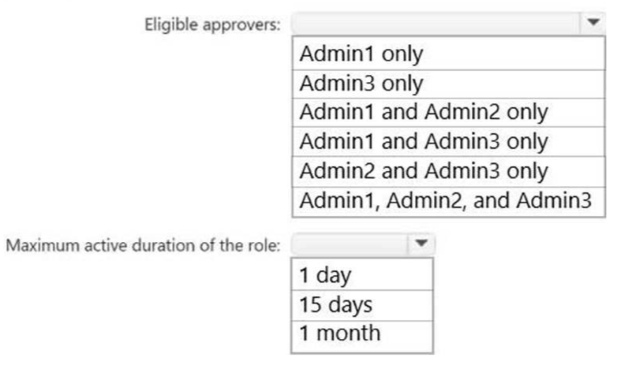
Which approvers can approve the request, and how long will User1 be an AI administrator after the role is approved? To answer, select the appropriate options in the answer area. NOTE: Each correct selection is worth one point.
Correct answer: To work with this question, an Exam Simulator is required.
Explanation:
Eligible approvers: Admin1 and Admin3 onlyMaximum active duration of the role: 1 dayApproval is required for activation of the AI Administrator role, but no specific approvers are configured. For a Microsoft Entra role, active Global Administrators and Privileged Role Administrators become the default approvers in this situation. Admin1 is a Global Administrator, and Admin3 is a Privileged Role Administrator. The configured activation maximum duration for the AI Administrator role is one day, so User1’s activated access expires after one day.Reference: https://learn.microsoft.com/en-us/entra/id-governance/privileged-identity-management/pim-how-to-change-default-settings Eligible approvers: Admin1 and Admin3 only
Maximum active duration of the role: 1 day
Approval is required for activation of the AI Administrator role, but no specific approvers are configured. For a Microsoft Entra role, active Global Administrators and Privileged Role Administrators become the default approvers in this situation. Admin1 is a Global Administrator, and Admin3 is a Privileged Role Administrator. The configured activation maximum duration for the AI Administrator role is one day, so User1’s activated access expires after one day.
Reference: https://learn.microsoft.com/en-us/entra/id-governance/privileged-identity-management/pim-how-to-change-default-settings
Question 3
You need to implement the planned change for storage2. The solution must meet the technical requirements for storage encryption.
What should you do?
- Enable purge protection for storage2.
- Create an encryption scope in storage2.
- Configure storage2 to use an account encryption key.
- Assign an Azure role-based access control (Azure RBAC) role to storage2.
Correct answer: C
Explanation:
Because storage2 must support Azure Table storage, it must be created to use an encryption key scoped to the storage account. Azure Table storage can then be encrypted by using a Fabrikam-managed customer-managed key. Encryption scopes apply to Blob storage and do not meet the requirement for Table storage encryption.Reference:https://learn.microsoft.com/en-us/azure/storage/common/account-encryption-key-create?tabs=portalhttps://learn.microsoft.com/en-us/azure/storage/blobs/encryption-scope-overview Because storage2 must support Azure Table storage, it must be created to use an encryption key scoped to the storage account. Azure Table storage can then be encrypted by using a Fabrikam-managed customer-managed key. Encryption scopes apply to Blob storage and do not meet the requirement for Table storage encryption.
Reference:
https://learn.microsoft.com/en-us/azure/storage/common/account-encryption-key-create?tabs=portal
https://learn.microsoft.com/en-us/azure/storage/blobs/encryption-scope-overview
Question 4
You have a Microsoft Entra tenant that has the following configurations:
- User consent for applications is disabled.
- Only administrators can grant permissions to applications.
You register an application named App1 that uses delegated Microsoft Graph permissions.
You need to configure App1 to meet the following requirements:
- Enable user sign-ins without interactive consent prompts.
- Enable App1 to access Microsoft Graph on behalf of the signed-in user.
What should you do?
- Configure enterprise applications to require user assignment and assign users to App1.
- Modify the app registration to use application permissions instead of delegated permissions.
- Add the required delegated Microsoft Graph permissions to the app registration and rely on user consent during sign-in.
- Grant admin consent to App1 for the required delegated permissions.
Correct answer: D
Explanation:
Admin consent grants the required delegated Microsoft Graph permissions on behalf of the tenant. App1 can then call Microsoft Graph in the context of a signed-in user without requiring individual users to respond to consent prompts, which is necessary because user consent is disabled.Reference:https://learn.microsoft.com/en-us/entra/identity/enterprise-apps/grant-admin-consent?pivots=portalhttps://learn.microsoft.com/en-us/entra/identity-platform/quickstart-configure-app-access-web-apis Admin consent grants the required delegated Microsoft Graph permissions on behalf of the tenant. App1 can then call Microsoft Graph in the context of a signed-in user without requiring individual users to respond to consent prompts, which is necessary because user consent is disabled.
Reference:
https://learn.microsoft.com/en-us/entra/identity/enterprise-apps/grant-admin-consent?pivots=portal
https://learn.microsoft.com/en-us/entra/identity-platform/quickstart-configure-app-access-web-apis
Question 5
You have an Azure subscription named Sub1 that contains 50 virtual machines. Sub1 has Microsoft Defender for Cloud enabled.
Sub1 contains an Azure key vault named KV1 and an Azure policy that enforces storing all secrets in KV1.
Occasionally, the developers at your company store plaintext tokens and SSH private keys on the virtual machines.
You need to configure Defender for Cloud to detect plaintext secrets on the virtual machines. The solution must minimize administrative changes to the virtual machines.
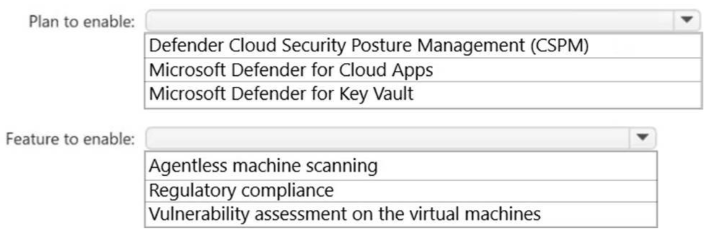
How should you configure Defender for Cloud? To answer, select the appropriate options in the answer area. NOTE: Each correct selection is worth one point.
Correct answer: To work with this question, an Exam Simulator is required.
Explanation:
Plan to enable: Defender Cloud Security Posture Management (CSPM)Feature to enable: Agentless machine scanningDefender CSPM supports agentless secrets scanning for Azure virtual machines. Enabling agentless machine scanning allows Defender for Cloud to analyze VM disk snapshots for exposed plaintext tokens and SSH private keys without requiring agents or configuration changes on the virtual machines.Reference:https://learn.microsoft.com/en-us/azure/defender-for-cloud/secrets-scanning-servers https://learn.microsoft.com/en-us/azure/defender-for-cloud/concept-agentless-data-collection Plan to enable: Defender Cloud Security Posture Management (CSPM)
Feature to enable: Agentless machine scanning
Defender CSPM supports agentless secrets scanning for Azure virtual machines. Enabling agentless machine scanning allows Defender for Cloud to analyze VM disk snapshots for exposed plaintext tokens and SSH private keys without requiring agents or configuration changes on the virtual machines.
Reference:
https://learn.microsoft.com/en-us/azure/defender-for-cloud/secrets-scanning-servers https://learn.microsoft.com/en-us/azure/defender-for-cloud/concept-agentless-data-collection
Question 6
You have a Microsoft Entra tenant that has user consent for applications disabled.
You register an application named App1 that requests the following Microsoft Graph delegated permissions:
- User.Read
- Mail.Read
You need to configure tenant permissions to meet the following requirements:
- Enable users to grant consent for low-risk permissions without administrator interaction.
- Ensure that applications requesting higher-privilege permissions require administrator approval.
What should you do?
- Grant tenant-wide admin consent to App1.
- Configure application assignments for App1.
- Configure Privileged Identity Management (PIM) role assignments.
- Create an app consent policy.
Correct answer: D
Explanation:
An app consent policy defines the conditions under which users can consent to delegated permissions, such as permitting approved low-risk permissions while withholding consent rights for higher-privilege permissions. Permissions outside the allowed policy conditions require administrator consent or approval.Reference:https://learn.microsoft.com/en-us/entra/identity/enterprise-apps/manage-app-consent-policies?pivots=ms-powershellhttps://learn.microsoft.com/en-us/entra/identity/enterprise-apps/configure-user-consent?pivots=portal An app consent policy defines the conditions under which users can consent to delegated permissions, such as permitting approved low-risk permissions while withholding consent rights for higher-privilege permissions. Permissions outside the allowed policy conditions require administrator consent or approval.
Reference:
https://learn.microsoft.com/en-us/entra/identity/enterprise-apps/manage-app-consent-policies?pivots=ms-powershell
https://learn.microsoft.com/en-us/entra/identity/enterprise-apps/configure-user-consent?pivots=portal
Question 7
You have an Azure management group named MG1 that contains two subscriptions named Sub1 and Sub2. Both subscriptions are linked to a Microsoft Entra tenant that contains a security group named Group1.
You need to ensure that the members of Group1 can assign roles to the resources in Sub1 and Sub2. The solution must follow the principle of least privilege.
Which role should you assign to Group1?
- Contributor at the MG1 scope
- Contributor at the Sub1 and Sub2 scopes
- User Access Administrator at the MG1 scope
- Owner at the MG1 scope
Correct answer: C
Explanation:
The User Access Administrator role permits members of Group1 to manage role assignments without granting them permission to modify the underlying Azure resources. Assigning the role at the MG1 scope causes the permission to be inherited by both Sub1 and Sub2 and their resources, providing centralizedleast-privilege access management.Reference:https://learn.microsoft.com/en-us/azure/role-based-access-control/role-definitionshttps://learn.microsoft.com/en-us/azure/role-based-access-control/elevate-access-global-admin?tabs=azure-portal%2Centra-audit-logshttps://learn.microsoft.com/en-us/azure/role-based-access-control/scope-overview The User Access Administrator role permits members of Group1 to manage role assignments without granting them permission to modify the underlying Azure resources. Assigning the role at the MG1 scope causes the permission to be inherited by both Sub1 and Sub2 and their resources, providing centralized
least-privilege access management.
Reference:
https://learn.microsoft.com/en-us/azure/role-based-access-control/role-definitions
https://learn.microsoft.com/en-us/azure/role-based-access-control/elevate-access-global-admin?tabs=azure-portal%2Centra-audit-logs
https://learn.microsoft.com/en-us/azure/role-based-access-control/scope-overview
Question 8
Testlet 1
Overview
Fabrikam, Inc. is a consulting company. The company has a main office in New York City and branch offices in Amsterdam and Singapore.
Existing Environment. Network environment
The on-premises network contains a datacenter in each office.
Existing Environment. Cloud environment
Fabrikam has two Azure subscriptions named Sub1 and Sub2 and a Microsoft 365 subscription that includes Microsoft 365 E5 licenses.
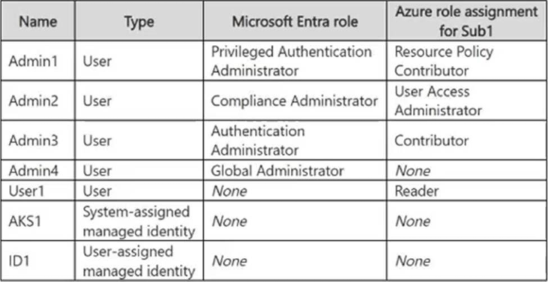
All the subscriptions are linked to a Microsoft Entra tenant named fabrikam.com that contains the identities shown in the following table.
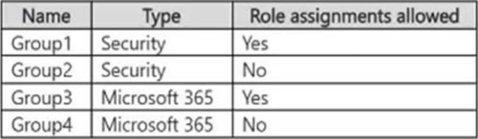
The tenant contains the groups shown in the following table.
All devices are enrolled in Microsoft Intune.
Existing Environment. Sub1 Resources
Sub1 contains a resource group named RG1 that contains the resources shown in the following table.
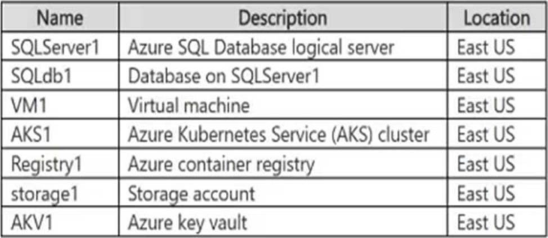
SQLServer1 uses Microsoft SQL Server authentication.
Sub1 has an Azure Web Application Firewall (WAF) named WAF1 that has the following types of rule sets:
- Bot Manager 1.1
- Azure-managed Default Rule Set (DRS)
Sub1 has the following compliance standards assigned in Microsoft Defender for Cloud:
- NIST SP 800-53 Rev. 4
- Microsoft cloud security benchmark (MCSB)
- System and Organization Controls (SOC) 2 Type 2
Existing Environment. Sub2 Resources
Sub2 contains a resource group named RG2.
Planned Changes and Requirements. Planned Changes
Fabrikam plans to implement the following changes:
- Deploy the following key vaults to RG1:
- AKV2 in the West Europe Azure region
- AKV3 in the Central US Azure region
- AKV4 in the East US Azure region
- Deploy the following key vaults to RG2:
- AKV5 in the East US region
- Configure VM1 to read data from storage1.
- Create function apps that have the following hosting plans:
- Fa1: Flex Consumption hosting plan
- Fa2: Consumption hosting plan
- Fa3: Dedicated hosting plan
- For WAF1, implement rate limiting rules based on the request location.
- Enable the NIST SP 800-53 Rev. 5 compliance standard in Defender for Cloud.
- Create a new storage account named storage2 that supports Azure Table storage.
- Enforce multifactor authentication (MFA) when database administrators access SQLdb1.
- Implement ExpressRoute circuits to the on-premises network as shown in the following table.
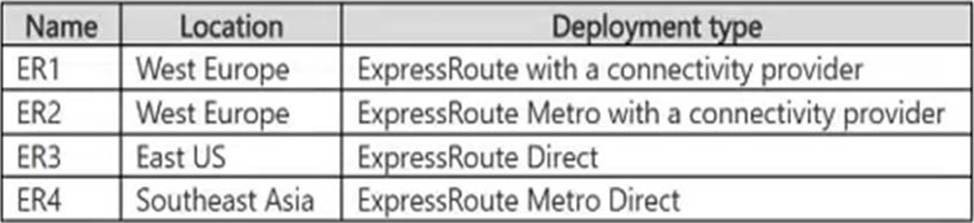
- For RG1, create a new Privileged Identity Management (PIM) eligible role assignment that assigns the Contributor role to supported groups.
Planned Changes and Requirements.
Technical Requirements
Fabrikam has the following technical requirements:
- If VM1 is deleted, the permissions for VM1 must be removed automatically.
- The AKS1 managed identity must only be able to pull images from Registry1.
- The ID1 managed identity must be able to push images to and pull images from Registry1.
- All the data in the storage accounts must be encrypted by using Fabrikam-managed keys.
- All outbound traffic from the function apps to the on-premises network must use ExpressRoute circuits.
- ExpressRoute connectivity between the on-premises network and the Azure environment must be encrypted by using Layer 2 or Layer 3 encryption.
You need to implement the planned change for SQLdb1.
Which two actions should you perform? Each correct answer presents part of the solution. NOTE: Each correct selection is worth one point.
- Create a compliance policy.
- Configure Microsoft Entra authentication for SQLServer1.
- Create a Conditional Access policy.
- Configure Federated client identity for SQLdb1.
- Configure a user-assigned managed identity for SQLdb1
Correct answer: A, B, C
Explanation:
Microsoft Entra authentication must be configured for SQLServer1 so database administrators can authenticate to Azure SQL Database by using Microsoft Entra identities. A Conditional Access policy can then target Azure SQL Database and require multifactor authentication when administrators connect to SQLdb1.Reference:https://learn.microsoft.com/en-us/azure/azure-sql/database/authentication-aad-configure?view=azuresql=azure-portalhttps://learn.microsoft.com/en-us/azure/azure-sql/database/conditional-access-configure?view=azuresql Microsoft Entra authentication must be configured for SQLServer1 so database administrators can authenticate to Azure SQL Database by using Microsoft Entra identities. A Conditional Access policy can then target Azure SQL Database and require multifactor authentication when administrators connect to SQLdb1.
Reference:
https://learn.microsoft.com/en-us/azure/azure-sql/database/authentication-aad-configure?view=azuresql=azure-portal
https://learn.microsoft.com/en-us/azure/azure-sql/database/conditional-access-configure?view=azuresql
Question 9
You have an Azure SQL Database logical server named Server1 that contains a database named DB1.
You need to configure authentication for Server1 to meet the following requirements:
- SQL authentication cannot be used for any databases on Server1.
- The solution must be enforced centrally at the server level.
What should you do?
- Configure a Microsoft Entra administrator for Server1.
- Enable a managed identity for Server1.
- Enable Microsoft Entra-only authentication for Server1.
- Remove SQL logins from DB1.
Correct answer: C
Explanation:
Enabling Microsoft Entra-only authentication on the Azure SQL logical server disables SQL authentication at the server level for every database hosted on Server1. Only Microsoft Entra-authenticated connections are permitted, centrally enforcing the required authentication policy.Reference: https://learn.microsoft.com/en-us/azure/azure-sql/database/authentication-azure-ad-only-authentication?view=azuresql=azure-cli Enabling Microsoft Entra-only authentication on the Azure SQL logical server disables SQL authentication at the server level for every database hosted on Server1. Only Microsoft Entra-authenticated connections are permitted, centrally enforcing the required authentication policy.
Reference: https://learn.microsoft.com/en-us/azure/azure-sql/database/authentication-azure-ad-only-authentication?view=azuresql=azure-cli
Question 10
You have a management group named MG1 that contains two subscriptions named Sub1 and Sub2.
Sub1 contains a resource group named RG-Exception and a resource group named RG1 that hosts Microsoft Foundry resources.
You need to assign an Azure policy to force new Foundry deployments in MG1 to use private endpoints.
The solution must NOT restrict deployments in RG-Exception.
How should you configure the policy?
- Assign the policy to MG1 and exclude RG-Exception.
- Assign the policy to Sub1 and RG-Exception.
- Assign the policy to MG1 and RG-Exception.
- Assign the policy to Sub1 and exclude RG-Exception.
Correct answer: A
Explanation:
Assigning the policy at the MG1 scope enforces the private endpoint requirement for new Microsoft Foundry deployments in all subscriptions and resource groups beneath the management group. Configuring RG-Exception as an excluded scope prevents the policy from restricting deployments in that resource group while maintaining centralized enforcement everywhere else in MG1.Reference:https://learn.microsoft.com/en-us/azure/governance/policy/overview https://learn.microsoft.com/en-us/azure/governance/policy/tutorials/create-and-manage Assigning the policy at the MG1 scope enforces the private endpoint requirement for new Microsoft Foundry deployments in all subscriptions and resource groups beneath the management group. Configuring RG-Exception as an excluded scope prevents the policy from restricting deployments in that resource group while maintaining centralized enforcement everywhere else in MG1.
Reference:
https://learn.microsoft.com/en-us/azure/governance/policy/overview https://learn.microsoft.com/en-us/azure/governance/policy/tutorials/create-and-manage
Question 11
You have an Azure key vault named KV1 that uses role-based access control (RBAC) for data plane authorization.
You have a user named User1 and an Azure App Service web app named App1 that has a system-assigned managed identity.
You need to configure authorization to meet the following requirements:
- App1 must be able to retrieve secrets from KV1.
- User1 must manage the KV1 settings without accessing secret values.
The solution must follow the principle of least privilege.
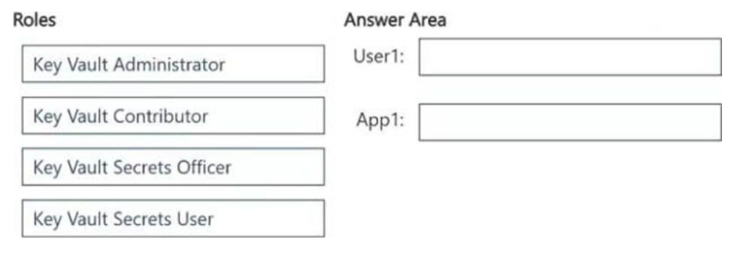
Which role should you assign to each identity for KV1? To answer, drag the appropriate roles to the correct identities. Each role may be used once, more than once, or not at all. You may need to drag the split bar between panes or scroll to view content. NOTE: Each correct selection is worth one point.
Correct answer: To work with this question, an Exam Simulator is required.
Explanation:
User1: Key Vault ContributorApp1: Key Vault Secrets UserThe Key Vault Contributor role allows User1 to manage the key vault resource and its configuration but does not grant access to secret values. The Key Vault Secrets User role grants App1’s managed identity permission to read secret contents from KV1 without allowing it to manage secrets or the vault, satisfying least privilege.Reference: https://learn.microsoft.com/en-us/azure/key-vault/general/rbac-guide?tabs=azure-cli User1: Key Vault Contributor
App1: Key Vault Secrets User
The Key Vault Contributor role allows User1 to manage the key vault resource and its configuration but does not grant access to secret values. The Key Vault Secrets User role grants App1’s managed identity permission to read secret contents from KV1 without allowing it to manage secrets or the vault, satisfying least privilege.
Reference: https://learn.microsoft.com/en-us/azure/key-vault/general/rbac-guide?tabs=azure-cli
HOW TO OPEN VCE FILES
Use VCE Exam Simulator to open VCE files
HOW TO OPEN VCEX FILES
Use ProfExam Simulator to open VCEX files
ProfExam at a 20% markdown
You have the opportunity to purchase ProfExam at a 20% reduced price
Get Now!